Work through this in order, not at random. Most “I installed it and it’s still not working” cases trace back to one of the first three checks: power and connections, what the indicator lights are actually telling you, and whether the two antennas are interacting with each other (oscillation or overload). Only after those are ruled out does it make sense to question the outdoor signal, the cable run, or the indoor antenna placement. The order matters because each step costs more time and disruption than the one before it, and there is no reason to pull cable or remount an antenna before you have ruled out a loose connector.
Not Working At All vs. Not Working Well Enough
These are two different complaints and they point in different directions. “Not working at all” usually means no power light, a solid fault indicator, or the unit shutting itself off within minutes of being turned on. “Not working well enough” means the booster is running, the lights look normal, and your phone still shows a weak or unchanged signal indoors. The first is almost always a connection or oscillation problem. The second is usually an outdoor signal, cable, or placement problem. Knowing which one you have before you start saves a lot of wasted effort.
Step 1: The Two-Minute Checks
Before anything else, confirm the boring stuff, because it is the most common cause and the cheapest to rule out.
- The power adapter is fully seated in both the unit and the outlet, and the outlet itself is live (test it with something else if you are not sure).
- The outdoor antenna cable is connected to the port marked for the outside antenna, and the indoor antenna cable is connected to the port marked for the inside antenna. Swapping these is a genuinely common mistake and it will not produce a working system.
- Every connector, especially any exposed to weather on the roof or exterior wall, is hand-tight. Over-tightening with a wrench can deform the connector pin as easily as a loose one can lose contact.
- Power cycle the unit: unplug it, wait a full minute, then plug it back in. This clears a temporary fault state and is worth doing before you conclude anything else.
Step 2: Read the Indicator Lights Before You Touch Anything
Every consumer booster has some form of status light, and what that pattern means is documented in the unit’s own manual, not in a generic color chart you find online. Indicator schemes differ between models and manufacturers, so a red light on one unit and a red light on another can mean different things. Find your model’s manual (most manufacturers publish these as PDFs on their support pages) and match your light pattern to it before doing anything physical. This single step tells you which of the remaining categories you are actually dealing with: a power fault, an oscillation shutdown, an overload condition, or no usable outdoor signal at all.
Step 3: Oscillation or Overload? Two Opposite Fixes
If the lights point to a signal fault rather than a power fault, the next question is whether you have oscillation (feedback between the two antennas) or overload (too much incoming signal saturating the amplifier). These look similar from the indicator panel and the fixes point in opposite directions, so it is worth getting this right before you move anything.
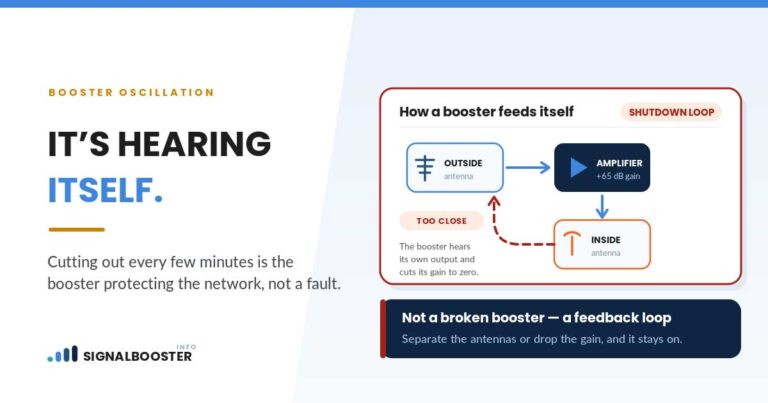
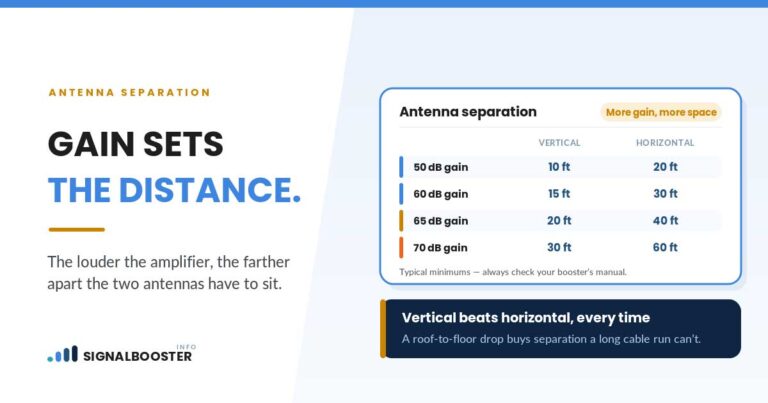
Oscillation happens when the indoor antenna’s amplified output reaches the outdoor antenna and gets amplified again, building a loop. The fix is more separation and structure between the two antennas, or less gain. We cover the full mechanism, including why the FCC requires the unit to detect and shut itself down when this happens, in why your signal booster keeps cutting out. Overload is the opposite problem: the outdoor antenna is picking up very strong signal, often because you are close to a cell site, and the fix is to reduce what reaches the amplifier rather than add separation. If you are not sure which one you have, our guide to antenna separation distance walks through both conditions side by side.
Step 4: Is the Outdoor Antenna Actually Seeing Usable Signal?
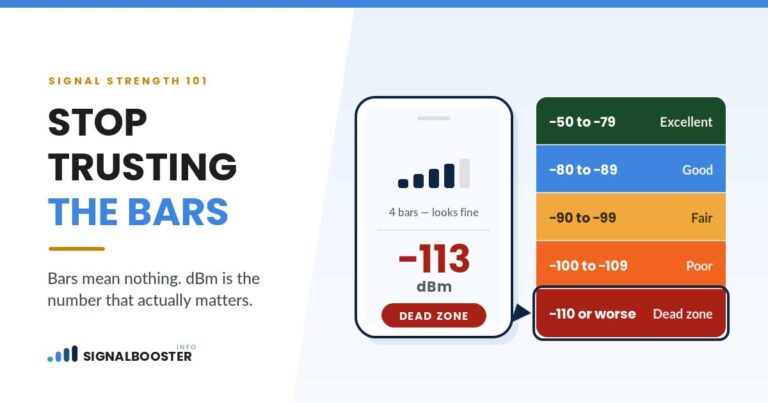
A booster amplifies whatever signal its outdoor antenna captures. It does not create signal. If the outdoor antenna is mounted somewhere with weak signal to begin with, an otherwise perfectly installed system will underperform, and no amount of troubleshooting the indoor side fixes that. Take a real dBm reading at the outdoor antenna’s mounting location, not just a bars count, using the method in how to check your dBm signal strength. If the outdoor reading itself is poor, the problem is upstream of the booster, and the fix is a better outdoor location, a directional antenna aimed more precisely, or accepting that this address may not be a good candidate for a booster at all.
Step 5: The Cable Run: Length, Damage, and Connector Loss
Every foot of coaxial cable between the outdoor antenna and the booster, and between the booster and the indoor antenna, eats a measurable amount of the signal traveling through it. A longer-than-necessary run, a cheaper cable type than the install calls for, or a single crushed or kinked section can quietly erase enough gain to explain “installed correctly but underwhelming” results, especially on longer runs. This is easy to overlook because the cable looks fine from the outside.
Two things to check here. First, inspect the physical cable for crush points, tight bend radii, and water intrusion at any outdoor connector, since a compromised connector can lose several dB on its own. Second, understand what your specific cable is actually costing you at the length you ran it. That is not a guess, it is printed on the cable manufacturer’s own spec sheet, and we walk through how to read one, plus what changes between common cable types, in coax cable loss, explained.
Step 6: Indoor Antenna Placement and Realistic Coverage
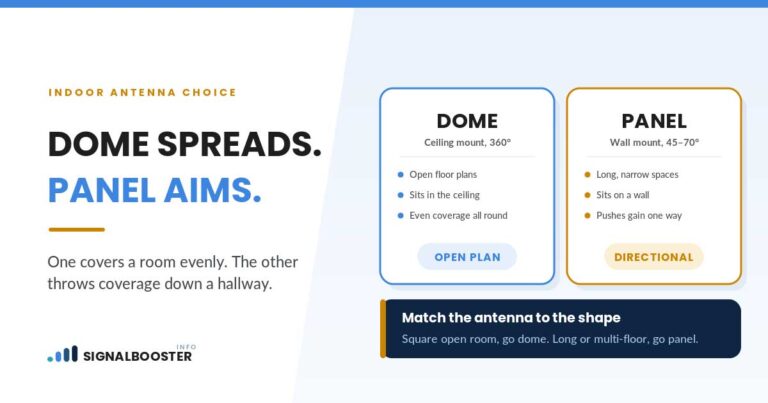
If the outdoor signal is good and the cable run checks out, but coverage is uneven or falls short of what you expected, the indoor antenna’s placement and type are the next thing to question. A dome antenna broadcasts in a circle from a central ceiling point and is a poor match for a long hallway or a multi-floor layout; a panel antenna is directional and suits those spaces better. It is also worth checking your expectations against the manufacturer’s own coverage rating, since that number assumes near-ideal outdoor signal. Our breakdown of how much coverage a booster really delivers covers how to translate the box number into something realistic for your house.
Step 7: Confirm Registration Isn’t the Blocker
This step will not fix a booster that is underperforming for one of the reasons above, because carrier registration is a compliance requirement, not something that changes the unit’s radio behavior. But it belongs on this list because it is the one item here that is not optional. In the US, consumer signal boosters must be FCC certified, and the FCC’s rules require the user to register the device with their wireless provider and operate it with that provider’s consent. The major carriers have committed to allowing certified boosters and maintain free registration processes for their own subscribers, so this is a step to complete, not an obstacle, and it is worth confirming while you are already troubleshooting. The full picture, including what “certified” actually covers, is in is a cell phone signal booster legal.
The Order-of-Operations Table
Here is the reasoning behind the sequence above, laid out so you can see why it runs in this order rather than as a random list of things to try.
| Step | Typical time to check | What it rules out |
|---|---|---|
| 1. Power and connections | 2 minutes | Loose connector, wrong port, dead outlet |
| 2. Indicator lights | 1 minute, once you have the manual | Which category of fault you actually have |
| 3. Oscillation vs. overload | 10 to 30 minutes | Antenna interaction problem |
| 4. Outdoor signal reading | 15 minutes | No usable signal for the booster to amplify |
| 5. Cable run inspection | 20 to 40 minutes, more if re-routing | Cable loss quietly eating your gain |
| 6. Indoor antenna type and placement | Ongoing | Coverage or antenna-type mismatch |
| 7. Registration check | 5 minutes | Compliance, not a performance fix, but not skippable |
Cheap, fast, non-destructive checks come first. Anything that involves pulling cable or remounting hardware comes last, and only after everything cheaper has been ruled out.
The Honest Part: Some Addresses Cannot Be Fixed By a Booster
If you have worked all the way through this list, the outdoor signal genuinely reads at the floor of what your phone can register, and moving the antenna does not change that, a booster is not going to produce a result no amplifier can create from nothing. That is a small minority of cases, but it happens, particularly in areas with weak outdoor signal to begin with. At that point the honest options are a different outdoor antenna position if one exists, Wi-Fi calling over your home internet, or, in some cases, switching to a carrier with better coverage at your address. That decision, and when a booster genuinely isn’t the right tool, is worth working through on its own rather than deciding it in the middle of a troubleshooting session.
FAQ
Why is my brand-new signal booster not working at all?
Start with power, connections, and port assignment (outside antenna to the outside port, inside to the inside port), then power cycle the unit. These simple issues account for a large share of “not working at all” reports, before oscillation, overload, or signal problems even enter the picture.
How do I know if it’s oscillation or just not working?
Check the indicator lights against your unit’s own manual first. Oscillation and overload usually show specific fault patterns rather than a simple “off” state, and the manual is the only reliable source for what your model’s lights mean.
Can a bad cable really be the reason my booster underperforms?
Yes. Every foot of coax between the antennas and the booster costs a measurable amount of signal, and a longer run, a lower-grade cable, or physical damage can erase enough gain to explain lukewarm results even with a correct installation otherwise.
Do I need to register my booster for it to actually work?
Registration does not change how the unit performs, since it is a compliance step rather than a technical one. But FCC rules require it for consumer boosters in the US, so confirm it is done while you are troubleshooting everything else.
What if I have checked everything and it still doesn’t work?
Confirm the outdoor signal itself is usable; a booster cannot amplify signal that isn’t there. If the outdoor reading is genuinely at the floor of what your phone registers, the realistic next steps are a different antenna position, Wi-Fi calling, or a carrier with better coverage at your address, rather than more troubleshooting of the booster itself.