Because a booster does not fill a house with signal. It re-broadcasts a limited amount of power from one indoor antenna, and that power falls off with distance and gets absorbed by every wall it passes through.
Uneven coverage is the normal, expected behavior of a working system, not a sign of a defective one. The room with the indoor antenna in it gets a strong signal. The room two walls away gets whatever survives the trip. If your booster helps in one place and does nothing in another, the system is almost certainly doing exactly what it was built to do, and the question is whether you can rearrange the job so it does it where you need it.
What Is Actually Limiting You
Three things set the size of the area a booster covers, and only one of them is under your control after purchase.
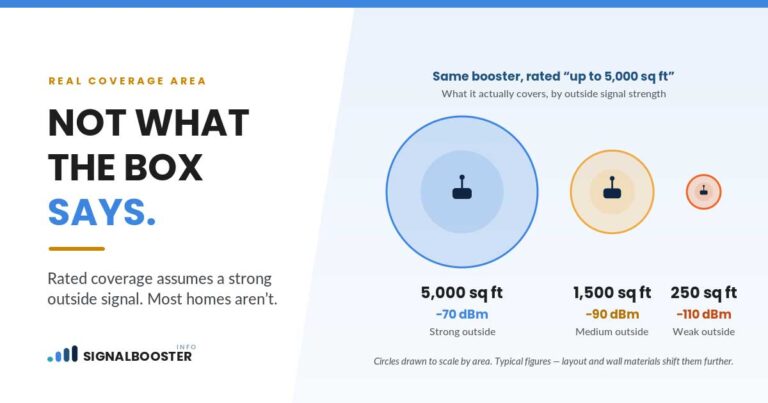
The strength of the outside signal. The amplifier works with what the outside antenna hands it. A weak, noisy input produces a weak output, and the coverage area shrinks accordingly. This is why the same booster covers a large area at one address and a single room at another.
The amplifier's authorized output. A consumer booster is a certified device with a maximum output power and a maximum gain fixed by its FCC certification, and it is not a dial you turn up. That ceiling is the same whether you are trying to cover one room or four.
What is between the indoor antenna and you. Interior walls, floors, appliances, tile, plaster over metal lath, and anything with foil backing all absorb signal. Our explanation of why cell signal is weaker on some floors than others covers the same physics applied vertically.
Diagnose It Before You Buy Anything
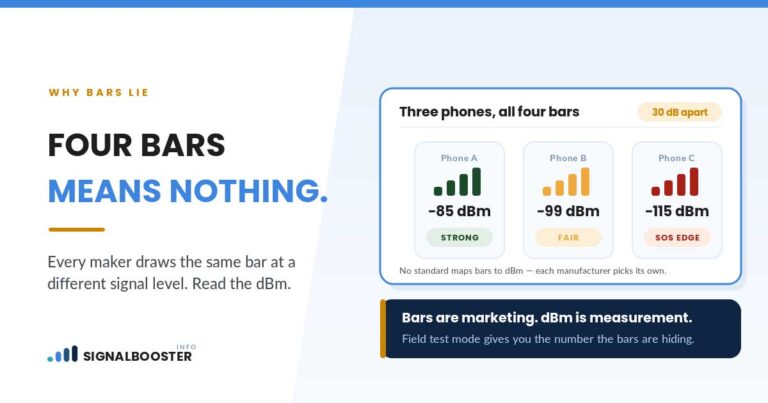
Do not add hardware to a problem you have not measured. Measure first, in dBm, using the method in our guide to checking real signal strength.
Take a reading in four places: right next to the indoor antenna, in the middle of the room with the antenna, in the doorway of the next room, and in the room where the booster seems to do nothing. Write all four down with the booster on, then repeat with it off.
What the pattern tells you:
- Strong at the antenna, falling off steadily as you walk away. Normal. Your coverage area is simply smaller than your house. This is a layout and placement problem.
- Weak even standing next to the indoor antenna. Not a coverage problem. The system is not delivering much at all, and the cause is upstream: the outside antenna, the aiming, the cable, or the booster reducing its own gain.
- Strong in the antenna's room, then a cliff rather than a slope at one particular wall. That wall is the obstacle. Metal lath, foil-backed insulation, a tiled wet wall, or a masonry chimney will do this.
- Identical readings with the booster on and off, everywhere. The booster is not contributing anything, which is a different article and a different checklist.
Placement Beats Almost Everything Else
The single most effective change most people can make costs nothing.
Move the indoor antenna toward the area you actually care about, not to the middle of the house. Center-of-the-house placement is a reasonable default when the coverage area is bigger than the house, and a poor one when it is not. If you spend your evenings in one room and your working hours in another, cover those and accept that the garage will not benefit.
Get the antenna out from behind furniture and out of cabinets. Anything solid immediately in front of it eats the signal before it gets anywhere.
Mind the direction it radiates. Indoor antennas are not all omnidirectional, and a directional one pointed at an exterior wall is putting most of your coverage into the yard.
Do not move it closer to the outside antenna to shorten the cable. That is how you create feedback. The minimum separation in your manual is not a suggestion, and the consequence of ignoring it is covered in antenna separation distance for a signal booster.
The Honest Part: More Antennas Split the Signal
Here is the thing the pages selling expansion kits tend to phrase carefully.
Adding a second indoor antenna does not give you two antennas' worth of coverage. It divides the amplifier's existing output between them, through a splitter that costs you something on top. Two antennas each get less than one antenna had. The reason to do it anyway is distribution: two moderate coverage bubbles in the two places you use may serve you far better than one stronger bubble in a hallway.
That trade only works if there is enough to divide in the first place. If the reading next to your single indoor antenna is already marginal, splitting it produces two useless bubbles instead of one adequate one. The prerequisite for adding antennas is a strong reading at the existing one, which is why the measurement above comes before the shopping.
We have no affiliate relationships and nothing to sell, so the blunt version is easy to write: for a lot of houses, moving the one antenna you already have is the better answer than buying a second one.
When Uneven Coverage Is a Symptom of Something Else
Two failure modes look like a coverage problem and are not.
The booster is reducing its own gain. If the outside and inside antennas are too close, or the outside signal is unusually strong, the amplifier will pull its own output down to stay within its authorized limits and to avoid feeding back on itself. Coverage shrinks as a result. That behavior is deliberate and required, and why a booster keeps cutting out from oscillation explains the version of it people notice most.
The coverage was never going to be what the box implied. Manufacturer coverage areas are best case figures measured under favorable conditions, and our piece on how many square feet a booster really covers goes through why the number on the box and the number in your house are different measurements.
A Realistic Order of Operations
- Measure in dBm at four points, booster on and off. Nothing else until this is done.
- Confirm the reading at the indoor antenna is good. If it is not, the problem is upstream and no amount of indoor rearranging fixes it.
- Move the indoor antenna toward the rooms you use most, keeping the separation from the outside antenna that your manual specifies.
- Re-measure. Same four points, same phone, same conditions.
- Only then consider a splitter and a second antenna, and only if the reading at the first antenna is comfortably strong.
- Accept a boundary. Every install has one. Deciding where it falls is the actual job.
FAQ
Why does my signal booster only work in one room?
Because the amplified signal comes from a single indoor antenna with a fixed output, and it weakens with distance and with every wall it crosses. That is normal behavior, not a fault.
Will adding a second indoor antenna double my coverage?
No. A splitter divides the amplifier's existing output between the antennas and adds a little loss of its own. It redistributes coverage, it does not create more of it.
How close do I need to be to the indoor antenna for it to help?
There is no universal distance. It depends on your outside signal, the booster's output, and your walls. Measure in dBm as you walk away from the antenna and find where the benefit disappears in your own house.
Can I just turn the gain up to reach the far rooms?
No. Maximum gain and output power are fixed by the device's FCC certification, and the features that hold it there are required. Changing them is not a supported adjustment.
Should I move the indoor antenna or buy a bigger booster?
Move it first and re-measure. Placement is free and it is the largest single variable in most homes. Hardware decisions are much easier to make once you know what your current system actually delivers.