Automatic gain control is the circuit that lowers your booster's amplification when the signal reaching it is already strong, or when the booster starts hearing its own output. It is a required feature of every certified consumer booster, and it is working correctly when it turns your booster down.
This is the single most misread behavior in the whole category. A booster that shows reduced gain, or that drops to a lower power level and stays there, looks broken. It is not. It is a device with a legal ceiling on what it may transmit, protecting a network it shares with everyone else on your street.
What AGC Is Doing
An amplifier has a fixed maximum output. Gain is how much it adds to whatever arrives at the input. Multiply a strong input by a large gain and you exceed the output the device is allowed to produce.
AGC is the loop that stops that happening. It watches the input, and when the input rises, it reduces gain so that the output stays inside the authorized limit. The output is being held steady on purpose. What moves is the amount of amplification, which is why the indicator on the front of the unit changes while the signal it delivers does not improve.
The FCC's signal booster rules put it directly. Under the Network Protection Standards at 47 CFR 20.21(e)(8)(ii)(B), consumer boosters "must have automatic limiting control to protect against excessive input signals that would cause output power and emissions in excess of that authorized by the Commission." Read on the eCFR text at law.cornell.edu on 2026-08-24.
The Three Reasons Yours Is Turning Itself Down
The outdoor signal is stronger than you thought. This is the happy case. If your outside antenna is picking up a healthy signal, the booster does not need much gain to deliver a good result indoors, and it will not use much. A booster running at reduced gain with good indoor coverage is a system working exactly as designed.
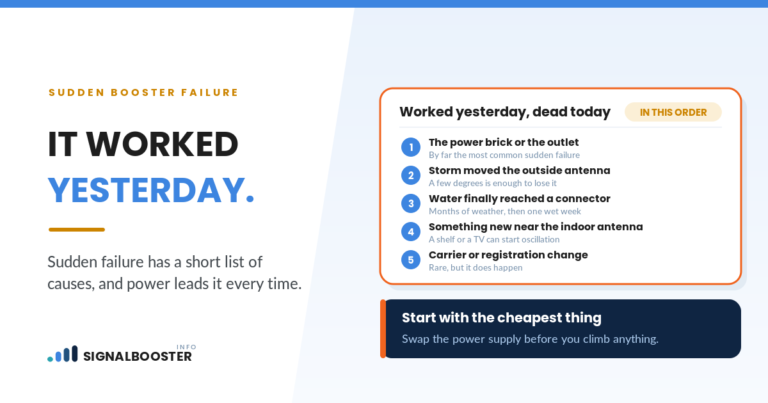
The antennas are hearing each other. If some of the indoor antenna's output reaches the outdoor antenna, the amplifier is amplifying its own output, and the loop runs away. The booster detects that and cuts gain to break it. This is the most common cause on a self install, and it is the failure that started this site. The mechanics are in why your booster keeps cutting out from oscillation, and the fix is nearly always distance and aim, covered in antenna separation distance.
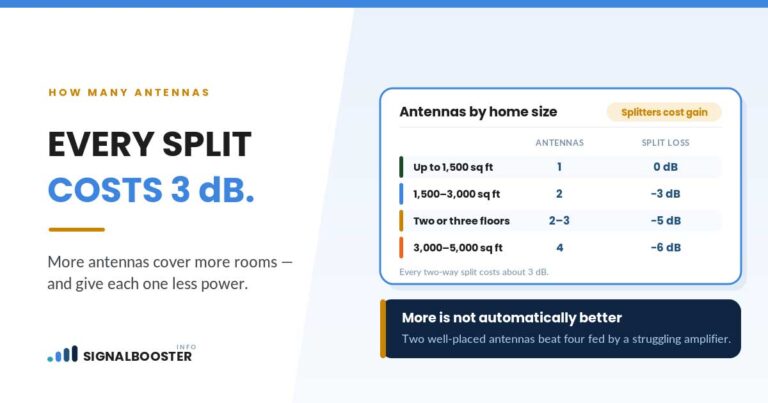
Too much is being re-radiated indoors. More indoor antennas, or one placed where its output finds a straight path back outside, gives the loop more ways to close. If you added a splitter recently and the gain dropped afterward, that is not a coincidence. How many indoor antennas you actually need covers the trade.
What the Rule Requires the Booster to Do
The behavior people find confusing is written into the certification requirements, and reading them makes the device much easier to understand.
Oscillation has to be detected fast. Under 47 CFR 20.21(e)(8)(ii)(A), consumer boosters must detect and mitigate oscillations in the uplink and downlink bands, and that detection and mitigation "must occur automatically within 0.3 seconds in the uplink band and within 1 second in the downlink band."
Mitigation has to hold before the device tries again. The rule requires the booster to keep mitigating for at least a minute before attempting to restart.
Repeated failure means the device stays off. After a set number of restart attempts, five in the rule as written, the booster must shut down until it is manually restarted. This is why a booster with a separation problem eventually stops working entirely rather than cycling forever.
Gain is capped, and the cap depends on the class of booster and how it couples to the phone. For mobile wideband consumer boosters the rule states maximum gains of 50 dB with an inside antenna, 23 dB for direct contact coupling, and 15 dB when directly connected. Fixed boosters are given a frequency dependent formula rather than a single number, and provider specific boosters have their own set. All of the above from 47 CFR 20.21, read 2026-08-24.
Why the Network Needs This More Than You Do
It helps to know what the rule is protecting, because it is not the booster and it is not the tower's equipment.
Your booster's uplink path transmits toward the tower. A tower receives from every phone in its area at once, and it can only distinguish a phone's signal from the background if the background stays low. An amplifier pushing more noise and power up than it should raises that background for everyone the tower serves, including people who are nowhere near you and have no booster at all. Their calls get worse so that yours can be louder.
That is why the interference protections are not optional and not adjustable, and why 47 CFR 20.21(a)(6) states that the operator may not deactivate any features of the Consumer Signal Booster designed to prevent harmful interference. It is also why the rule conditions operation on getting your carrier's consent and registering the device, and requires you to shut it down if the FCC or a licensed provider asks. The registration side is covered in is a signal booster legal.
There is nothing on this page about increasing gain, and there will not be. The gain limit is part of the device's certification. A booster modified past it is no longer the device that was authorized, and the person operating it is the one responsible.
What to Do Instead When Gain Drops
Everything worth doing is on the outside of the box.
Measure before you conclude anything. A gain indicator is not a performance measure. Take a dBm reading at the spot you care about, using the method in our guide to checking real signal strength. If the reading is good, reduced gain is not a problem you have.
Increase the separation between the antennas. More vertical distance, more horizontal distance, or a roof between them. This is the fix for the majority of gain reduction on home installs.
Aim the outdoor antenna away from the indoor one, and aim a directional indoor antenna away from the outdoor one. Direction is free and it is often enough on its own.
Move the indoor antenna off exterior walls and away from windows facing the outdoor antenna, which are the easiest paths back out.
Reduce the number of indoor antennas if you added them recently and the gain fell.
Power cycle after each change, and give it a couple of minutes. A booster that shut down after repeated restart attempts needs a manual restart before it will show you whether your change worked.
FAQ
Is automatic gain control a fault?
No. It is a required feature of every certified consumer booster, and 47 CFR 20.21 requires automatic limiting control to keep output and emissions within what the device is authorized to produce.
Why does my booster show reduced gain even though my signal is still bad?
Usually because it is hearing its own output. The booster cuts gain to break the loop, so the coverage stays poor while the gain indicator stays low. Increase the separation between your antennas and re-measure.
Can I turn the gain up on my signal booster?
Maximum gain is fixed by the device's FCC certification, and the rule prohibits deactivating features designed to prevent harmful interference. Some boosters allow band level adjustment within the certified range through the manufacturer's own app or controls, and that is the only adjustment to make. Do not modify the device.
Why does my booster shut down completely?
The rule requires a booster that repeatedly fails to clear an oscillation to stop and stay off until a person restarts it, after five restart attempts as written. It is telling you the install geometry needs to change, not that the unit failed.
Does reduced gain mean I bought too much booster?
Not necessarily. It can mean your outdoor signal is strong enough that the booster does not need full gain, which is a good outcome. Judge it by the dBm at the place you use your phone, not by the indicator.