Short answer: a new phone fixes weak signal in a narrow set of cases, not most of them. It can help if your current phone is genuinely old enough to be missing bands your carrier now relies on, its modem generation is several steps behind current network technology, or the device itself is damaged in a way that affects reception (a cracked antenna connection, water exposure, worn SIM contacts). It does nothing if the real problem is your building, the terrain around you, or your distance from the tower, because no phone’s radio, however new, can amplify a signal that never reaches the room. Before you spend money on either fix, there’s a straightforward way to test which situation you’re actually in.
The Assumption Worth Testing Before You Buy Anything
The reasoning usually goes like this: the phone is a few years old, the signal is bad, so a newer phone must be the fix. It’s a reasonable-sounding assumption, and it’s wrong often enough that it’s worth testing before you spend.
Here’s why the assumption breaks down. A phone’s age tells you almost nothing on its own about why your signal is weak in one specific room, one specific building, or one specific stretch of road. Plenty of people replace an aging phone, carry it into the exact same weak spot, and get the exact same weak signal, because the phone was never the limiting factor. The limiting factor was what was (or wasn’t) reaching that spot in the first place.
This isn’t a case against ever upgrading a phone. It’s a case against upgrading a phone as a signal fix without first checking whether that’s actually what’s wrong. The two situations look identical from the outside (weak bars, dropped calls, slow data) and require completely different money to solve.
What a Phone’s Radio Can and Can’t Do
Every phone has a radio and antenna built to receive whatever signal is already present at its location and convert it into a call, text, or data connection. That’s the entire job. The radio doesn’t generate signal; it listens for signal that’s already arriving from a tower and does something useful with it.
What changes between an older phone and a newer one is how well that listening job is done at the margins. A more capable modem can typically support more frequency bands, handle more of the network technologies a carrier currently runs on, and in some cases squeeze a slightly more usable connection out of a weak-but-present signal than an older modem can. None of that is the same thing as creating signal where there isn’t any.
This is the same physical limit a signal booster runs into, for a different reason. A booster amplifies whatever signal already reaches the outside of a building; a phone’s radio decodes whatever signal already reaches the phone. Neither device manufactures a signal that was never there to begin with. If you want the fuller mechanical picture of how a booster does its side of this job, what a signal booster actually is and how it works covers it in more detail.
Where a New Phone Genuinely Helps
There are three situations where a newer phone is a legitimate fix, not a guess.
The phone doesn’t support the bands your carrier is currently using. Carriers periodically shift which frequencies and network technologies they lean on. A phone old enough to have shipped without support for a band a carrier now relies on in your area will show weak or missing signal no matter how strong that signal actually is outside. You can check this for your specific device by comparing its published band support against your carrier’s current network information, something only your device and carrier combination can answer, not a general rule tied to a model year.
The modem generation is well behind current network technology. A modem several generations behind current hardware generally has less headroom for decoding a weak-but-present signal and less support for the features carriers use to make the most of available spectrum. This is a genuine, if marginal, factor in areas that already have some usable outdoor signal. It is not a factor in areas that don’t.
The device itself is physically compromised. A cracked housing pressing on an internal antenna connection, water damage that’s corroded a connector, or worn SIM contacts can all produce a “weak signal” reading that’s actually a hardware fault wearing a coverage problem’s clothes. This is worth ruling out with a repair estimate or a SIM swap before assuming it’s either a phone-upgrade or a booster problem.
| Situation | Does a new phone help? | Why |
|---|---|---|
| Phone doesn’t support the bands your carrier currently uses | Yes | The modem can’t decode a signal it isn’t built to receive, no matter how strong that signal is outside |
| Modem generation is well behind current network tech | Often, at the margin | Less decoding headroom in weak-but-present signal conditions; irrelevant where there’s no signal to decode |
| Antenna damage, water exposure, or worn SIM contacts | Yes (repair or replace) | A damaged receive path can mimic weak coverage but is actually a hardware fault |
| Weak signal caused by walls, distance, or terrain | No | The phone, old or new, never receives signal that isn’t reaching the building |
| Full signal outside but it drops in one room or floor | No | An obstruction pattern the phone’s radio can’t compensate for |
| No signal at all, even standing outside | No | There is nothing for any receiver, new or old, to pick up |
Where No Phone Can Help
If your outdoor signal is weak or absent because of distance from the nearest tower, hills and tree cover attenuating it, or the tower simply not reaching your area with much strength, no phone fixes that. A newer modem can be marginally better at working with a weak signal that exists; it cannot conjure one that doesn’t reach your property at all. Distance from a tower and physical obstructions are two separate mechanisms worth telling apart, because they point to different next steps.
The same is true indoors. If the signal outside your home is genuinely fine but drops the moment you walk into a specific room, basement, or back bedroom, that’s a building problem, not a phone problem. Concrete, metal siding, low-E glass, and similar materials block cellular frequencies before they ever reach the phone sitting in your hand, and it doesn’t matter whether that phone was bought this year or five years ago. Why weak signal shows up specifically at home walks through the common building-related causes in more detail.
The honest summary: a phone upgrade fixes a phone problem. It does not fix a location problem, and most weak-signal complaints turn out to be location problems.
How to Tell Which Situation You’re In
Three checks, in order, before you spend money on anything.
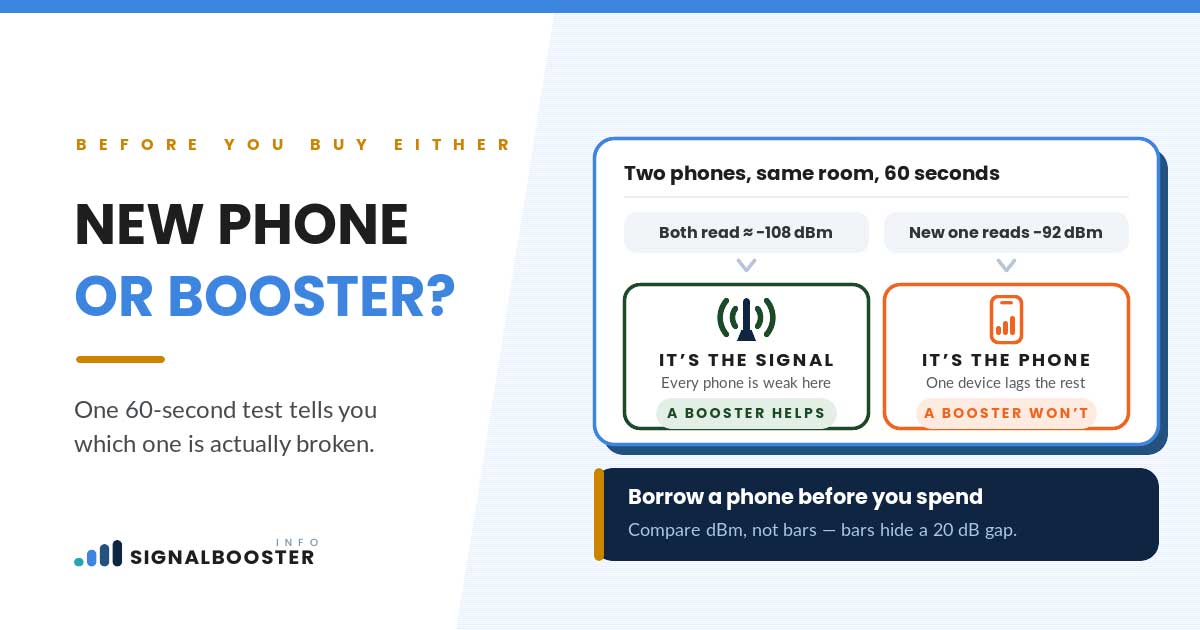
1. Compare readings on another handset in the same spot. If a second phone, on the same carrier, held in the exact same location, shows the same weak signal your phone does, the problem isn’t specific to your device. That points toward a location or carrier-coverage cause, not a phone one.
2. Check the same phone in a known-good location. Walk your current phone to a spot where you know signal is normally reliable (a friend’s house, a spot outside your own home you’ve noticed is fine) and see if it performs normally there. If your phone works fine elsewhere and only struggles in one specific room or building, that’s an obstruction problem tied to that location, not a hardware limitation of the phone.
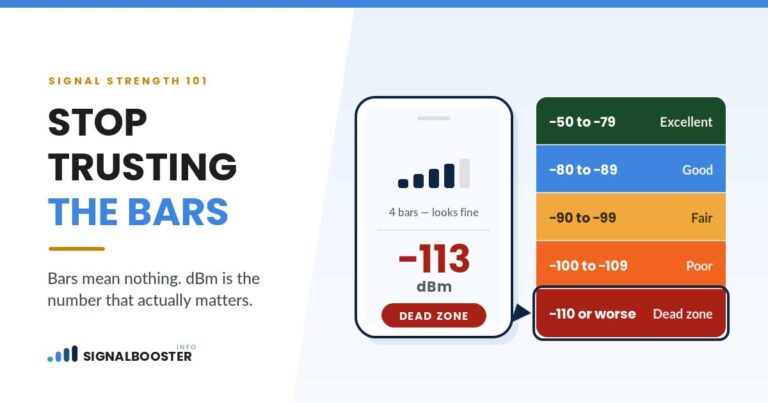
3. Read the actual number, not the bars. Bars are a relative, manufacturer-defined scale that varies between phones and doesn’t tell you much on its own. How to check your real dBm signal strength walks through pulling the actual number on iPhone and Android, and what counts as a good dBm reading explains how to interpret it once you have it. A consistently weak dBm reading in one location, confirmed on more than one device, is a location problem. A weak reading on only your phone, with another device showing a normal number in the same spot, points back toward the device itself.
New Phone vs. New Carrier vs. Booster: The Real Decision Tree
Once you know which situation you’re in, the next purchase mostly picks itself.
- Band mismatch, an outdated modem, or device damage confirmed by the tests above: a phone repair, SIM replacement, or upgrade is the right fix. A booster or a carrier switch won’t touch a problem that’s inside the device.
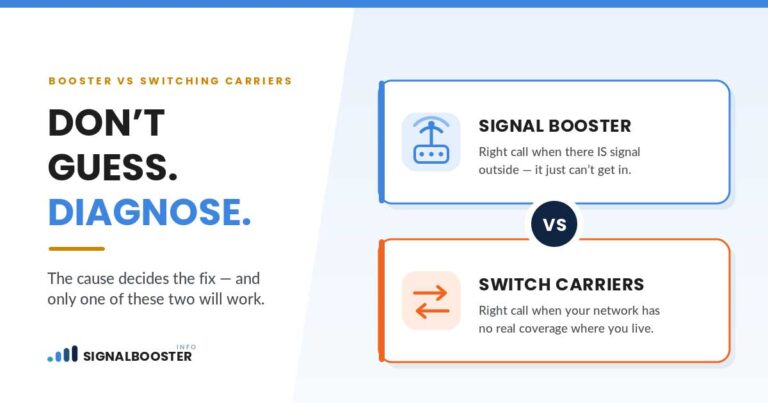
- Weak signal everywhere on your carrier, indoors and outdoors, with another carrier’s phone showing better results in the same spot: that’s a network-coverage gap specific to your carrier, not your building or your phone. Signal booster vs. switching carriers covers how to diagnose that distinction properly and what switching actually involves.
- Usable signal outside or near a window, but it drops in specific rooms or floors: that’s a building-and-distance problem, exactly what a booster is built to solve. What a signal booster is and how it works is the place to start before buying one.
The one purchase to avoid is guessing. Buying a new phone to fix a building problem, or buying a booster to fix a device fault, spends money without touching the actual cause.
What This Means If You’re Already Under Contract
If you’re financing a phone or locked into a carrier plan, the stakes of guessing wrong go up, not down. Running the three checks above before your next payment or upgrade decision costs nothing and can save you from committing to the wrong fix for another year or two.
If the diagnosis points to a device issue but you’re mid-contract on your current phone, a repair or SIM replacement is usually cheaper and faster than an early upgrade, and it’s worth pricing out before assuming a full replacement is necessary. If the diagnosis points to a building or distance problem, upgrading your phone on schedule (whenever that naturally happens) won’t touch the actual issue, so there’s no reason to move that purchase up. And if it turns out to be a genuine carrier-coverage gap, that’s a decision about your plan, not your device, and it deserves its own comparison rather than being solved by whichever purchase happens to be next on your calendar.
FAQ
Does a newer phone always get better signal than an older one?
No. A newer phone can help at the margins if the older phone lacks band support the carrier now relies on, has a modem generation well behind current network tech, or is physically damaged. In a location with weak or no outdoor signal, phone age isn’t the limiting factor and a new phone won’t change the outcome.
How do I know if my phone doesn’t support my carrier’s current bands?
Compare your specific device’s published band and network-technology support against your carrier’s current network information for your area. This is device-and-carrier specific, so there’s no general age cutoff that applies to every phone.
My phone shows fewer bars than my partner’s phone on the same carrier, standing in the same room. What does that mean?
That’s a useful comparison to make. If it’s consistent and repeatable, it points toward a device-level cause (older hardware, damage, a SIM issue) rather than a location problem, since you’re both standing in the same spot with the same carrier.
Can a bad SIM cause the same symptoms as weak signal?
Yes. Worn or loose SIM contacts can produce dropped calls and inconsistent data that look identical to weak outdoor signal. A SIM replacement is worth ruling out before buying either a new phone or a signal booster.
What if the tests point to both a device issue and a building issue at once?
That happens. Fix the device-level cause first (repair, SIM, or upgrade) since it’s cheaper to rule out, then re-test in the room where signal is weak. If the problem persists after the device issue is resolved, you’re looking at a genuine building or distance problem, and a booster becomes the relevant next step.