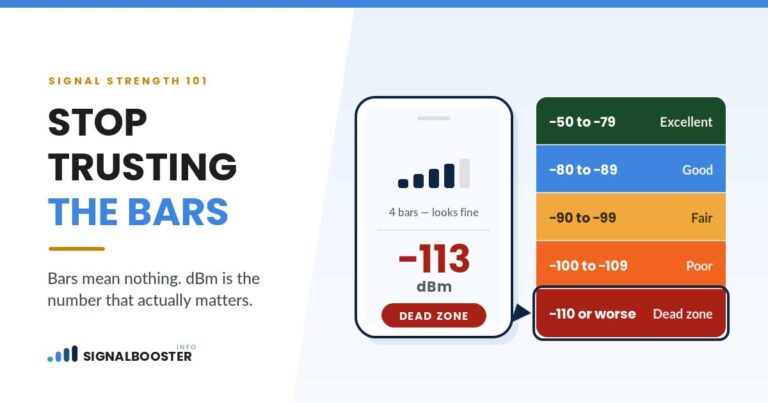
Record dBm readings at fixed spots before you power the booster on, repeat them under the same conditions afterward, and compare. Bars, speed tests, and the feeling that calls seem better are all too noisy to answer the question.
The test itself is simple. What makes it useless when people try it is that they change three things at once: a different spot, a different moment, a different phone. A booster test is a controlled comparison or it is nothing, and getting the control right takes about twenty minutes of planning and no equipment you do not already own.
Do the "Before" First, and Do Not Skip It
The most common mistake in this whole cluster is installing first and measuring afterward. Once the booster is up, the honest baseline is gone, and switching it off does not fully recreate it because conditions have moved on.
Before you mount anything:
- Pick your spots and write them down. Three indoor spots you actually care about, plus one outdoors near where the donor antenna will go. Be specific: "kitchen, standing at the sink," not "kitchen."
- Pick one phone and use it for everything. Different models and different carriers report differently, and mixing them makes the comparison meaningless.
- Note the time of day and the weather. You will repeat under similar conditions.
- Take the reading in dBm, not bars. The method for both iPhone and Android is in our guide to checking your real signal strength. Bars are a manufacturer's own scaling of the underlying number and they are not comparable between phones, which is the subject of why bars are not an accurate measurement.
- Take three readings at each spot, roughly thirty seconds apart, and write down all three. Signal moves on its own. One number is an anecdote.
Do the same outdoors. That reading tells you what the booster has to work with, and it sets a realistic expectation for the whole install.
Record Quality, Not Just Strength
This is the step that separates a real test from a vendor demo, and it is where a lot of disappointing installs get explained.
Strength (the RSRP or RSCP figure your phone reports in dBm) is how loud the signal is. Quality (reported as SINR, RSRQ, or Ec/Io depending on the network and the phone) is how cleanly it stands out from noise and interference. They move independently, and a booster can raise one while leaving the other flat or worse.
That matters because an amplifier amplifies noise along with signal. If the input at your donor antenna is noisy, you get a louder version of a noisy signal. The dBm number improves, the experience does not, and the reader concludes the booster is defective when the real problem is what the outdoor antenna is picking up. Our explanation of signal strength versus signal quality covers why the two numbers behave differently.
So record both, at every spot, before and after. If your phone shows only one of them, record the one it shows and note which it was.
Decide What Counts as Success Before You Look
Set the bar in advance, because after an afternoon of work everyone is inclined to see improvement.
Decibels are logarithmic, which is worth holding on to. A 3 dB change is a factor of two in power, and a 10 dB change is a factor of ten. So a move from a reading in the range where calls fail to one where they hold is a very large real change even though the number moved by a modest amount. Booster vendors often quote a target improvement figure. Ignore it. The only success criterion that matters is whether the spots you care about crossed from unusable to usable, and what counts as a good dBm reading sets out where those boundaries roughly fall.
Write your criterion down as a sentence before you start. For example: "the basement office holds a fifteen minute call without dropping, and its reading improves by at least 10 dB."
The "After" Test, Done Properly
Now the controls. Every one of these exists because skipping it produces a false result.
Give the booster a few minutes. It has to power up, settle its gain, and let your phone find the boosted signal.
Force the phone to re-register. Toggle airplane mode on and off at each spot, then wait for it to settle before reading. A phone that is still latched to the tower directly, or to a different band, will report the old situation.
Stand in the exact same place, at the same height, holding the phone the same way. Your body blocks signal. Half a meter and a different grip are both enough to change the number.
Repeat the three readings per spot, the same as before.
Test at a similar time of day, in similar weather. Congestion and rain both move the result, and neither one is your booster.
Do not judge the install by the reading next to the indoor antenna. That spot always looks good. The test that matters is at the far edge of where you need coverage.
Then test the uplink, because dBm does not measure it. Place a real call from each spot and hold it for several minutes. Send a large photo or run an upload. A booster's downlink can look excellent while the path back to the tower is the thing failing.
Reading Your Results
| What you see | What it means |
|---|---|
| Strength up, quality up, calls hold | It worked. Record the numbers as your new baseline. |
| Strength up, quality flat or worse, experience unchanged | The booster is amplifying a noisy input. Look at donor antenna aim and position, not at the amplifier. |
| Strength up next to the indoor antenna, unchanged elsewhere | Coverage is working, it just does not reach far enough. A placement question. |
| Nothing changed anywhere, on or off | The booster is not contributing. Check power, connections, and whether it has shut itself down. |
| Better at first, then worse after a few minutes | Classic feedback. The system is hearing itself and cutting gain. See signal booster oscillation. |
| Downlink fine, calls still drop | Test the uplink deliberately, and look at quality rather than strength. |
Keep the Numbers
The most valuable thing this test produces is not today's verdict. It is a written baseline.
Put the spots, the readings, the date, the phone, and the weather in one place. In six months, when the signal seems worse, you will be able to tell the difference between a real change and a bad afternoon in about ten minutes. Without it, you will be guessing, and guessing is what sells hardware nobody needed.
We have no affiliate relationships and no products to sell, so the useful version of the advice is easy to give: if the test says the booster did not help, the right response is to fix the install or return the equipment, not to buy more of it. Where it works, uneven results across the house are normal and usually a placement question, covered in why a booster works in one room but not others.
FAQ
How do I know if my signal booster is working?
Compare dBm readings at the same fixed spots before and after, taken on the same phone under similar conditions, and confirm that real calls hold at those spots. A change in bars is not evidence.
How much improvement should I expect from a signal booster?
There is no universal figure, because it depends entirely on the signal available at your donor antenna. Judge it by whether the places you care about crossed from unusable to usable, not by a number from a product page.
Why did my dBm improve but my calls are still bad?
Most likely the signal got louder without getting cleaner. Amplifiers raise noise along with signal, so check the quality reading and the aim and position of the outdoor antenna.
How long should I wait after turning the booster on before testing?
Give it a few minutes to power up and settle, then toggle airplane mode on your phone at each spot so it re-registers before you read the number.
Do I need an app to test a signal booster?
No. Your phone's own field test or network status screen reports the dBm figure, and that is the reading to use. Third party apps read the same underlying value and can lag or round it.