Cable loss (also called attenuation) is the amount of signal your coaxial cable itself absorbs between your antenna and your booster, measured in decibels per 100 feet. It changes with two things: the frequency you’re operating at (higher cellular bands lose more per foot than lower ones) and the cable itself (thicker, better-built cable loses less per foot than thin, general-purpose coax). A longer run simply multiplies whatever the per-100-foot figure is. The number that actually matters for your install is not a generic “coax loses signal” statement, it’s the specific figure printed on your own cable’s manufacturer datasheet, at the frequency band closest to your carrier’s, for the exact length you’re running.
What “Cable Loss” Actually Means
Every cable, no matter how well made, resists the signal passing through it. Some of that energy is lost as heat rather than arriving at the far end. Manufacturers measure this precisely and publish it as attenuation, expressed in dB per 100 feet (or per 100 meters) at a series of test frequencies. This is not a marketing estimate; it’s a lab measurement on that specific cable construction, and it’s the same figure engineers use to design any RF system, not just cellular boosters.
The number is unavoidable. There is no cable with zero loss over distance. The question is never whether your cable is losing signal, it’s how much, and whether that amount matters for your specific install. If you are troubleshooting a booster that seems to be running but underperforming, cable loss belongs on the checklist alongside the other usual suspects, not as an afterthought.
The Two Variables That Determine Your Number: Frequency and Length
Frequency. Attenuation increases with frequency for every coaxial cable type. A cable that loses relatively little at, say, 700 MHz loses noticeably more at 1900 or 2500 MHz, because higher-frequency energy couples into the cable’s dielectric and conductor losses more efficiently. This is why a datasheet’s attenuation table always lists loss across a range of frequencies rather than a single number: the same cable behaves differently depending on what band you’re running through it.
Length. Attenuation scales with distance in a straightforward way: if a cable loses X dB per 100 feet at a given frequency, a 50-foot run of that same cable loses roughly half of X, and a 200-foot run loses roughly double. This is why the per-100-foot figure on a datasheet is genuinely useful even though almost nobody runs exactly 100 feet: you scale it to your actual length.
Reading Your Own Cable’s Spec Sheet
Every reputable coax manufacturer publishes an attenuation table for each cable it sells. Here’s how to use one:
- Find your cable’s exact model. “RG6” and “LMR400” are cable families, not single products; the manufacturer, jacket type, and shield construction all affect the published number, so look up the specific part you have, not just the family name.
- Locate the attenuation or “insertion loss” table, usually listed in dB per 100 ft against a column of frequencies.
- Find the frequency closest to your carrier’s band. US cellular service spans roughly 700 MHz to 2500 MHz depending on the carrier and band, so most datasheets will have a listed point near what you need, even if it isn’t an exact match.
- Multiply by your actual run length, divided by 100. A cable rated at 6 dB per 100 feet run for 50 feet costs roughly 3 dB. Run for 150 feet, it costs roughly 9 dB.
As an example of what a real datasheet looks like, CommScope’s published specification sheet for its 5781 BKRL RG6 quad-shield cable lists attenuation, as reported on that datasheet, of 5.05 dB per 100 ft at 700 MHz, 5.79 dB per 100 ft at 900 MHz, 6.11 dB per 100 ft at 1000 MHz, and 8.43 dB per 100 ft at 1800 MHz. Those are one manufacturer’s numbers for one specific RG6 product; a different RG6 cable from a different manufacturer, or a different shield construction from the same manufacturer, will print its own numbers on its own datasheet. Always check the sheet for the cable you actually have rather than assuming every cable sold under a given family name performs identically.
Why Cable Loss Actually Matters for a Booster
A booster’s rated gain describes how much it amplifies the signal it receives, but that gain has to overcome every loss between the antenna and the amplifier, and again between the amplifier and the indoor antenna. Cable loss is one of the biggest of those losses on a typical install, especially on longer runs. A unit rated for a given amount of gain is not delivering that full number to your indoor antenna if a meaningful chunk of it was already spent getting the signal down a long run of lossy cable before it even reached the amplifier.
This is why two identical booster kits, installed in two different houses, can produce different results even with similar outdoor signal, checked the way we describe in how to check your dBm signal strength: the house with the shorter, better cable run keeps more of the booster’s rated gain, and the house with a long run of thin cable is quietly giving some of that gain back to the cable itself before the amplifier ever gets to use it.
The Two Losses People Forget: Connectors and Splitters
Cable length is not the only place loss hides.
Connectors each add a small amount of additional loss at every point the cable is joined or terminated, on top of whatever the cable itself costs. A run with several connectors, or a poorly seated one, costs more than the cable’s datasheet figure alone would suggest, which is part of why physical connection quality matters as much as cable choice.
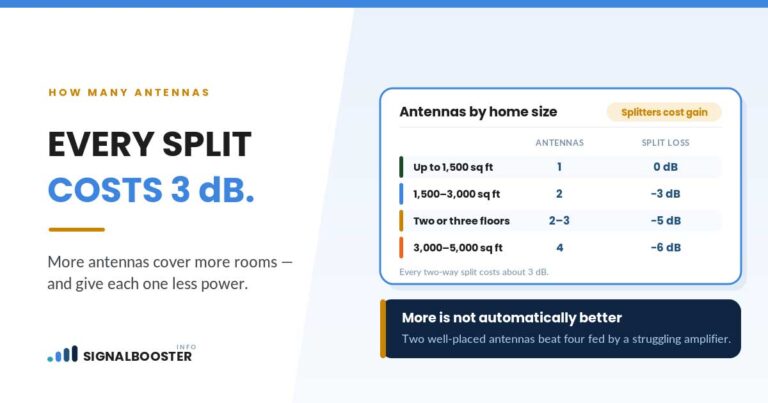
Splitters divide the signal, and dividing power is unavoidably lossy: a two-way splitter, by the basic math of dividing power between two outputs, gives up roughly 3 dB per output before accounting for the hardware’s own additional loss, and a four-way splitter costs more than that per leg. If your install uses a splitter to feed multiple indoor antennas from one booster, that loss belongs in the same budget as your cable run, not treated as free.
A Worked Example: What a Longer Run Actually Costs
Take the CommScope RG6 figures above as an illustration. At 1800 MHz, that cable’s datasheet lists 8.43 dB per 100 ft, as reported. Scaled to a 75-foot run: 8.43 multiplied by 0.75 is roughly 6.3 dB lost to the cable alone, before any connector or splitter loss is added. On a booster with a modest gain budget, 6.3 dB is not a trivial number; it is a meaningful fraction of what the unit is rated to add. This is exactly why installation guides that recommend “the shortest practical cable run” are not being vague for no reason: every extra foot has a real, calculable cost, printed on a datasheet, not a guess.
When to Consider a Lower-Loss Cable Instead
If your cable run is long enough that the loss is eating a significant share of your booster’s gain, the fix is not always “run it anyway and hope.” Some cable types are built specifically to lose less per foot at the cost of being thicker and less flexible, which matters more on long outdoor runs than short indoor ones. If you’re deciding between two specific cable types for a longer run, our head-to-head comparison of RG6 versus LMR400 signal loss walks through both cables’ published numbers side by side at matching frequencies.
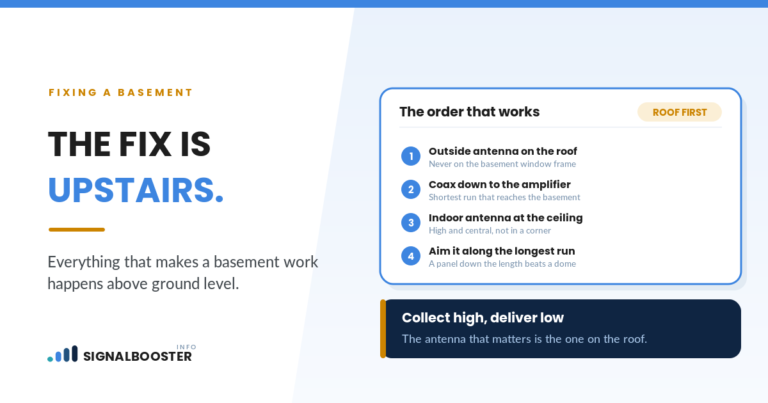
Cable choice is only one part of a clean install. Where you mount the antenna in the first place, and whether you’ve avoided the common mounting mistakes that cost signal before the cable even enters the picture, matters just as much. And if you’re still deciding between an attic or roof location, that decision affects how long your cable run needs to be in the first place, which is covered in attic mount versus roof mount.
FAQ
What is coax cable loss and why does it matter for a signal booster?
It’s the amount of signal your cable itself absorbs between the antenna and the booster, measured in dB per 100 feet. It matters because that loss comes directly out of your booster’s rated gain; a long run of lossy cable can quietly eat a meaningful share of what the unit is supposed to add.
Does cable length or cable type matter more?
Both matter, and they multiply together. A short run of higher-loss cable can lose less overall than a long run of lower-loss cable. Check your specific cable’s datasheet at your frequency, then multiply by your actual length to get the real number for your install.
How do I find my cable’s dB loss at my frequency?
Look up the manufacturer and exact model printed on the cable jacket, find its published attenuation or insertion-loss table (usually in dB per 100 ft), and read the value closest to your carrier’s band. Multiply by your run length divided by 100 to scale it to your actual cable.
Does a splitter cause loss too?
Yes. Dividing a signal between two outputs is unavoidably lossy, roughly 3 dB per leg for a basic two-way split, before the splitter’s own hardware loss is added. If your install feeds more than one indoor antenna from a single booster, budget for that loss separately from the cable.
Can cable loss alone explain a weak booster result?
It can be a significant contributor, especially on longer runs, but it’s rarely the only factor. Outdoor signal strength at the antenna and antenna placement typically matter more; cable loss is the piece most installs get wrong simply because nobody checked the actual number for their run.