Calls got better and data did not. Or the opposite: pages load, and people still say you sound like you are underwater. Either way the reaction is the same, that the booster is half broken and probably faulty. It usually is not. A partial improvement is the single most predictable outcome of amplifying a cellular signal, because calls and data do not need the same thing from a connection and a booster does not treat them as one job. Understanding why turns a vague disappointment into a specific, checkable problem, and most of the checks cost nothing.
Why a Partial Fix Is the Normal Result, Not a Defect
A booster does one physical thing: it captures cellular signal at an outdoor antenna, amplifies it, and rebroadcasts it inside, along with sending your phone’s transmissions back out the same path. The mechanics are covered in full in our overview of what a signal booster actually is. What matters here is what that description leaves out. It does not sort traffic. It has no idea whether the radio energy passing through it is carrying a phone call or a video stream, and it makes no decision about either.
So when calls improve and data does not, nothing inside the amplifier chose that. The difference comes from what a call and a data session each require to work, and those requirements are genuinely far apart. A voice call is a small, steady, heavily compressed stream that networks prioritize and that tolerates a poor connection remarkably well. Throughput, the thing you experience as fast or slow data, needs a much cleaner link before it produces a number you would call usable. Raise the signal a little and the call crosses its threshold long before data crosses its own.
That is the short answer. The rest of this piece is the six specific causes, in the order worth checking them.
Cause One: Your Booster Covers Some of Your Bands, Not All of Them
This is the most common cause and the most often missed. A booster amplifies specific frequency bands, and every model publishes the list it was built and certified for. Your carrier, meanwhile, uses several bands at your address, and it does not necessarily use them for the same purposes or with the same reach. If your phone is holding a call on a band the booster covers, and reaching for data on a band it does not, you get exactly the split you are seeing, from equipment that is working perfectly.
The reverse produces the reverse symptom. If the band carrying your data is amplified and the one your phone falls back to for voice is not, data improves while calls stay rough. This is also why the same model of booster behaves differently in two houses on different carriers, and sometimes in two houses on the same carrier in different parts of a city. Our piece on whether a signal booster works with every carrier goes through how to read a band list against what your carrier actually uses where you live, and that is the first document to open when a booster helps one thing and not the other.
Cause Two: Strength Improved, Quality Did Not
The second cause is the one that surprises technically minded readers, because it sounds like it should not be possible. An amplifier can raise your signal reading and leave your data speed exactly where it was.
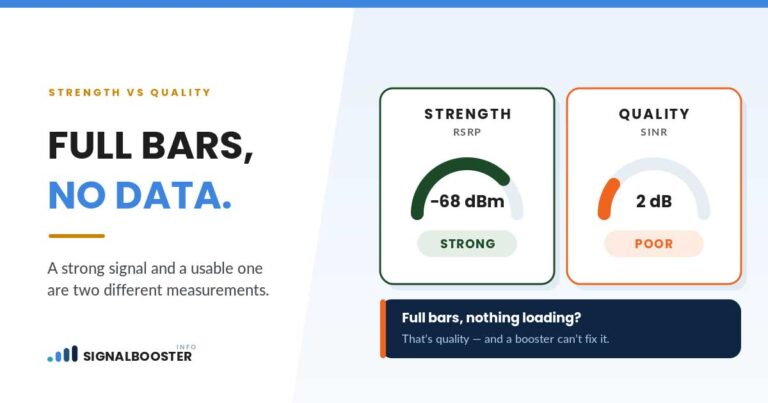
Your phone measures two different things about its connection. Strength is how much power is arriving. Quality is how much of that power is actually useful once interference and background noise are counted against it. A booster acts on strength. It is an amplifier, and an amplifier raises whatever arrives at its input, which includes the noise arriving alongside the signal. If the outdoor signal was weak but clean, amplifying it improves both numbers and everything gets better. If the outdoor signal was weak and noisy, amplification raises the noise right along with it, and the ratio between them, which is what data throughput actually depends on, barely moves.
A voice call survives that condition. Data throughput does not, because the network drops to a slower, more robust way of sending data when the link is noisy, and that is felt directly as slow pages and stalled video. If your dBm reading improved after the install and your speeds did not, this is very likely what happened, and what counts as a good dBm number is worth rereading with that distinction in mind: a better strength number is not by itself a promise of a better connection.
Cause Three: The Two Directions Are Separate Problems
Signal travels both ways, and the two paths can be in different states. Downlink is what the tower sends to you. Uplink is what your phone sends back. A booster handles both, but a problem in one direction produces symptoms that look nothing like a problem in the other, and readers routinely describe an uplink problem as though it were a downlink one.
Downlink trouble looks like slow downloads, buffering, and callers who sound broken to you. Uplink trouble looks like the opposite: you hear them fine, they say you keep cutting out, and uploads crawl while downloads seem acceptable. Your phone is a small battery-powered transmitter and it has far less power to work with than the tower does, so in a marginal location the uplink is usually the side that fails first.
There is a further wrinkle worth knowing before you go looking for a setting to change. Consumer boosters are required to include automatic gain and limiting controls that reduce their own output under certain conditions, which is deliberate, is part of what certification covers, and is not something an owner is permitted to defeat. If your booster appears to be holding itself back, that is very likely the design working as intended rather than a fault. The rules governing certified consumer boosters, including what an operator may and may not do to them, are set out in is a signal booster legal.
Cause Four: Where You Are Standing When You Notice It
People make calls all over the house and use data sitting in one particular chair. That alone can produce the complaint.
Rebroadcast signal is strongest close to the indoor antenna and weakens with distance and with every wall in between, in the same way the original signal did outside. Because a call needs so much less than throughput does, the area where calls are reliably better is meaningfully larger than the area where data is meaningfully faster. Someone whose desk sits at the far edge of that coverage will honestly report that the booster fixed calls and did nothing for data, when what it actually did was fix both, in a zone that does not include their desk.
The test takes two minutes. Stand next to the indoor antenna, check your data speed, then check it again where you normally sit. If the two readings are far apart, this is a placement question rather than a compatibility one, and it is usually the cheapest of the six to fix.
Cause Five: Data Is Fine, Calls Still Drop
The mirror-image complaint has its own set of causes, and the first thing to establish is whether the calls are actually failing at the cellular layer at all.
If Wi-Fi calling is enabled on the phone, calls may be routing over your home internet connection rather than the cellular network, and a call that fails in that mode is a home internet problem wearing a cell signal costume. Turning it off temporarily is a fast way to find out which system you are actually testing.
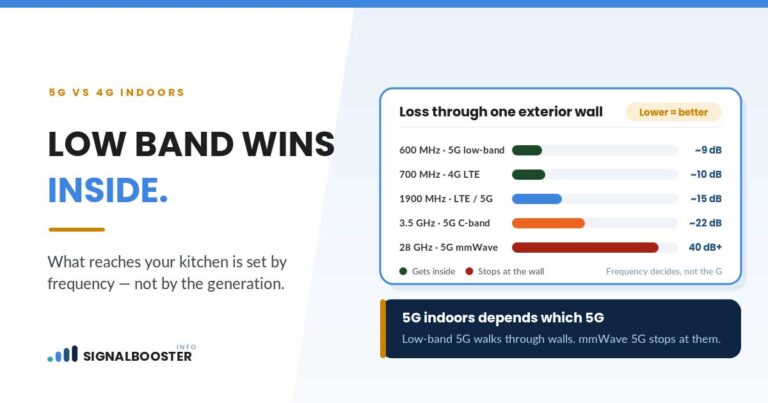
If the calls are genuinely cellular, the usual mechanism is movement between coverage areas rather than raw weakness. A call dropping when you walk from one room to another, or when you go out the front door, points to a handover between the booster’s rebroadcast zone and the outside network rather than to a lack of signal in either. And on modern networks, where voice is carried over the same data connection your phone uses for everything else, the network type your phone is on matters to how a marginal link behaves, which is covered in 5G vs 4G signal strength.
Cause Six: A Booster Cannot Buy Capacity
The sixth cause is the one no equipment fixes, and it is worth checking before spending anything else.
A booster improves the link between your phone and the tower. It does nothing whatsoever about how many other people are using that tower at the same time. When a tower is congested, calls generally continue to work, because voice traffic is prioritized and needs very little, while data slows down for everyone connected to it. That is the same symptom as this whole article, produced by something happening miles away.
The tell is timing. If data is fine at seven in the morning and unusable at eight in the evening, day after day, while calls are steady throughout, the pattern is congestion rather than your install. There is no equipment answer to that, and any page that offers you one is selling something.
The Order Worth Checking Them In
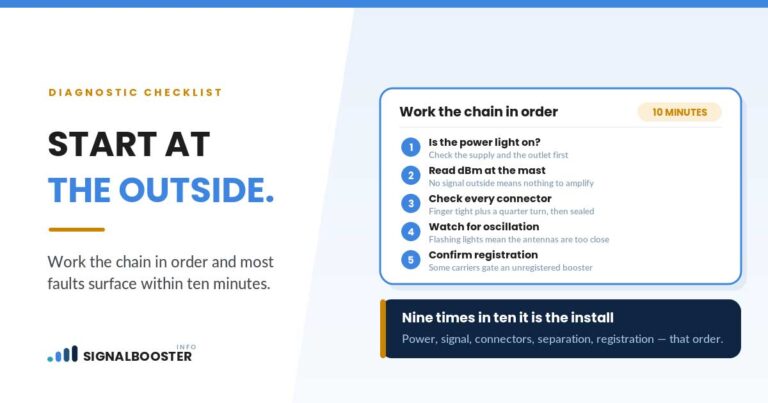
Work through these in sequence, because each one rules out a layer of the problem cheaply before you touch the hardware.
- Check whether the problem follows the clock. Same time every day points to congestion, not to your install.
- Check whether the problem follows the room. Big difference next to the indoor antenna versus at your desk points to placement.
- Check both directions separately. Run a speed test that reports upload as well as download, and ask the person on the other end whether they can hear you.
- Check your booster’s band list against what your carrier uses at your address. This is the single most likely cause and the most commonly skipped step.
- Check strength and quality, not just bars. A better strength reading with unchanged speeds is the noise-amplification case in Cause Two.
- Check whether Wi-Fi calling is quietly involved if the complaint is about calls.
If none of those explains it, the problem may predate the booster entirely, in which case the general diagnostic walkthrough in why your phone signal is weak at home is the better starting point, and so is confirming whether the underlying issue is distance or something in the way, which cell tower distance versus obstructions covers.
What This Means Before You Buy Anything Else
The instinct after a partial fix is to buy a second piece of equipment, usually another antenna. Sometimes that is right, and sometimes it makes the situation worse, because splitting one amplifier’s output across more antennas divides the power that was already marginal at the far end.
The honest sequence is to identify which of the six causes you actually have first. A band gap is not solved by more antennas. Congestion is not solved by any hardware you can buy. A noisy outdoor signal is not solved by amplifying it harder. Placement and coverage area genuinely can be solved with additional indoor antennas, and that is one specific case out of six. Knowing which one you are in is the difference between a purchase that works and a purchase that changes nothing.
FAQ
Why did my signal booster fix my calls but not my internet?
Because a voice call needs far less from a connection than data throughput does. Networks prioritize voice, and a call uses a small, heavily compressed, robust stream, so it crosses the threshold of “working” at a signal level where data is still slow. The most common specific cause is that the booster covers the band carrying your calls but not the one carrying your data.
Can a booster improve my dBm reading and not my speed?
Yes, and this is normal rather than a fault. An amplifier raises the noise arriving with the signal as well as the signal itself. If the outdoor signal was noisy to begin with, strength improves while quality, which is what throughput actually depends on, stays roughly where it was.
My downloads are fine but people say I sound terrible. Is that the same problem?
It is the same family, in the other direction. Downlink is what the tower sends you; uplink is what your phone sends back. Your phone transmits with far less power than a tower does, so in a weak location the uplink is usually the side that struggles, which shows up as callers not hearing you clearly and as slow uploads.
Will adding another indoor antenna fix data that did not improve?
Only if the cause is coverage area, meaning data is genuinely better next to the existing antenna and worse where you use it. If the cause is a band gap, a noisy outdoor signal, or tower congestion, adding antennas divides the available power further and can make things worse rather than better.
Could my carrier’s network be the actual problem rather than my booster?
Yes. A booster improves your link to the tower and does nothing about how loaded that tower is. If data slows at the same time every day while calls stay steady, that is congestion at the network, and no equipment on your property changes it.