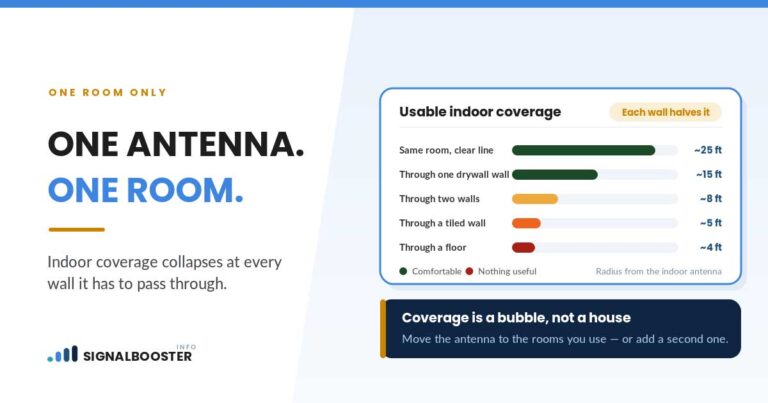
Yes, but only when the reading at your existing indoor antenna is strong enough to lose half and still be usable in both places. A 2-way splitter sends roughly half of the amplifier’s output to each antenna, which is a 3 dB split. The splitter adds a little loss of its own, and the extra cable to the second antenna costs more. Split a strong signal and you get two useful rooms. Split a marginal one and you get two weak ones.
Whether you need a second antenna at all is a separate question, answered in how many indoor antennas a booster needs. This page assumes you have decided to try two, and covers the splitter itself: what it costs you, which one belongs in your system, where it goes, and when it is the wrong tool.
What a splitter does to the numbers
A splitter takes one input and divides it between its outputs. It cannot create power, so each output gets a share.
weBoost’s splitter listing (weBoost, read September 11, 2026) states the loss for each of its 75 ohm models:
| Splitter | Stated loss (weBoost listing) | What each antenna gets |
|---|---|---|
| 2-way | -3 dB | About half |
| 3-way | -4.8 dB | About a third |
| 4-way | -6 dB | About a quarter |
Those figures sit close to the theoretical split, because in decibels 3 means half and 6 means a quarter. The practical point: going from a 2-way to a 4-way does not cost “a bit more”. It halves each antenna’s share again.
A full spec sheet separates the split from the device’s own imperfection. A retailer’s specification for a 50 ohm, 700 to 2700 MHz two-way splitter with N-female connectors (SignalBooster.com, read September 11, 2026) lists a distribution loss of 3.0 dB, insertion loss of 0.5 dB or less, and isolation of 20 dB or more. Distribution loss is the split itself. Insertion loss is what the device costs on top of the split. Isolation is how well the two outputs are kept apart from each other.
Then add the cable. The second antenna is almost always farther from the amplifier than the first, and every foot of coax costs signal, more so at higher frequencies. Coax cable loss for a signal booster shows how to read that off your own cable’s spec sheet. On a lot of installs, the extra cable to the far antenna costs about as much as the splitter does.
Splitter or tap?
A splitter divides evenly. A tap, also sold as a directional coupler, divides unevenly: most of the signal continues to one output and a smaller share goes to the other. Manufacturers state the ratio on each tap’s spec sheet.
A tap makes sense when the two areas are not equal. One large family room that needs most of the signal and one small office that needs a little is a tap situation. So is one antenna close to the amplifier and another at the end of a long run, where the even split would give the near antenna more than it needs and leave the far one short.
Choosing a splitter that belongs in your system
Five checks, in this order.
1. It is an approved component for your booster. The FCC’s consumer booster rule, 47 CFR 20.21 (read September 11, 2026 via Cornell’s Legal Information Institute), requires a consumer booster to be operated with approved antennas, cables and/or coupling devices. A splitter is how a second antenna gets coupled in. The cleanest way to comply is the splitter, or the add-on antenna kit, that your booster’s manufacturer sells or lists for your model. The FCC’s consumer signal booster page (checked September 11, 2026) sets the other two ground rules: only properly certified consumer boosters may be used, and each must be registered with your wireless provider, free, before use.
2. The impedance matches. Booster systems are built as either 50 ohm or 75 ohm. Wilson Amplifiers’ splitter page (read September 11, 2026) puts it plainly: 50 ohm splitters are best used with 50 ohm systems, and 75 ohm splitters with 75 ohm systems. Your kit’s manual or spec sheet tells you which you have.
3. The frequency range covers your booster’s bands. The retailer spec above is rated 700 to 2700 MHz, and weBoost lists its 50 ohm wideband splitters at 600 to 4,000 MHz. Compare the splitter’s range with the bands on your booster’s own spec sheet. Do not assume a splitter left over from a TV or satellite install covers them.
4. The connectors match your cable. N-type and F-type connectors are both common on booster kits. Every adapter adds another joint, another small loss and another place for a fault to hide.
5. The number of outputs matches the number of antennas. For two antennas, buy a 2-way. A 4-way with two outputs in use still costs its full split, and an output left open is an unmatched port. If an output must stay unused, follow the manufacturer’s guidance for it.
Where the splitter goes
Put it where the two cable runs naturally divide, and aim for the least total cable. On most houses that is close to the amplifier, but not always. If both antennas are at the far end of the house, one run out to a splitter near them plus two short runs beats two long runs back to the amplifier.
Two practical rules:
- Keep the splitter indoors and dry unless it is specifically rated for outdoor use.
- Keep the run to the far antenna as short as the layout allows. That antenna is already the weakest point in the system.
Setting it up
- Record a baseline first. Take dBm readings next to the existing indoor antenna and in the room you want to add, with the booster on and off. The comparison method is in the how many antennas guide linked above.
- Unplug the booster before changing any connections.
- Connect the amplifier’s inside antenna port to the splitter’s input, then each splitter output to an antenna. Hand tight, no cross-threading.
- Choose each antenna’s type for its space. A dome suits a central ceiling spot in an open room; a panel suits a long room or a hallway. The trade-offs are in dome vs. panel indoor antennas.
- Keep every indoor antenna away from the outdoor antenna. Two indoor antennas are two leakage paths back to the outside, and the spacing guidance in your manual applies to each of them. Antenna separation distance explains why.
- Power up, watch the lights, and take the same readings again.
If the lights show a shutdown or reduced gain after the second antenna goes in, the new antenna is probably too close to the outdoor antenna or facing toward it. Move it before changing anything else.
This setup should not involve more than reaching a ceiling. If the new antenna location means working at height, or running cable through an attic or a wall with wiring in it, treat that as a separate job with its own precautions, and check for wiring and pipes before drilling anything.
When a splitter is the wrong tool
The reading at your first antenna is only marginal. Splitting it helps nobody. Improve the outdoor side first: antenna position, aim and cable.
The far room is a placement problem, not a capacity problem. If moving the one antenna you already have fixes it, that fix is free. Why a booster works in one room but not others explains how to tell which you have.
The second area is behind concrete, in another building, or best served by a tower in another direction. A share of one amplifier’s output will not reach it. That is a case for a second complete system, with its own outdoor antenna and its own registration.
You want to combine two boosters. A splitter used in reverse is a combiner, and joining two amplifiers onto one antenna invites them to amplify each other’s output. That is a feedback problem, not a coverage solution.
FAQ
Does a splitter weaken a signal booster?
It does not weaken the booster, but it divides the booster’s output. A 2-way split gives each antenna about half, and the splitter and the extra cable add small losses on top of that.
Can I use a cable TV splitter for my signal booster?
Only if it matches your system’s impedance, covers your booster’s frequency bands, and is a component your booster’s maker approves. A generic TV splitter usually fails at least one of those, and the FCC rule requires approved coupling devices.
Is a 3-way splitter fine for two antennas?
No. You pay the 3-way split on both antennas and leave a port unused. Match the splitter to the number of antennas.
Do I need to register again after adding a second antenna?
The registration identifies the booster by make, model, serial number and location, and a splitter changes none of those. If you are unsure, your carrier’s registration page is the place to check.
The short version
A splitter shares one amplifier between two antennas, roughly half each before cable losses. It works when the signal at your first antenna has room to spare. Use the splitter your booster’s maker lists for your kit, matched in impedance, frequency range and connectors, with exactly as many outputs as antennas. If the second room is behind concrete or in another building, stop splitting and think about a second system.
Where this comes from. Splitter loss figures are from weBoost’s accessory listing and a retailer’s published specification sheet, both read on the date given, and the impedance guidance from Wilson Amplifiers’ splitter page. The approved components requirement is from 47 CFR 20.21 as published by Cornell’s Legal Information Institute, and the certification and registration points from the FCC’s consumer signal booster page; these apply in the United States. This site has not tested any splitter, and no coverage figure is given here.