If your phone has no signal or weak signal at home, the cause is almost always one of four things: dense building materials blocking the radio waves before they reach you, distance from the nearest cell tower, a temporary network or weather problem, or (less often) a phone or case issue. The fastest way to know which one applies to your house is a two-minute test: check your bars outside, then check them again just inside the front door. That single comparison points you toward the right fix, and rules out the ones that will not help.
I’m Arif, and I’ve been the person standing in my own dead zone. Before I ever installed a signal booster for anyone else, I installed one badly for myself in 2018, backward antenna, wrong cable, a feedback loop that made my signal worse than when I started. That failure is why this piece exists as a diagnostic, not a sales pitch. If you want the fundamentals first, what a signal booster actually is and how it works covers that; this article is the step that comes before deciding whether you need one at all. Here’s the order I actually check things in, and why.
The Bars-Outside Test: The First Thing to Check Before Anything Else
Before you look at anything else, walk outside your front door and look at your bars. Then walk back to the room where your signal is worst and look again.
This single comparison splits the whole problem in two:
- Good signal outside, bad signal inside: your building itself is the problem. That’s fixable. Keep reading.
- Bad or no signal outside too: your building isn’t the main issue, distance from the tower or a genuine coverage gap is. That changes what’s worth trying next, and it rules out a whole category of “fixes” that only help indoor reception.
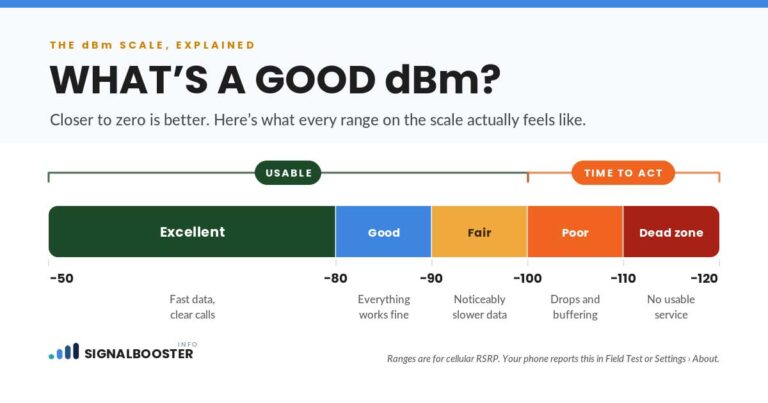
Bars are a rough gauge, not a real measurement, carriers scale them differently and two phones standing in the same spot can show different bar counts. If you want to make a real buying decision later rather than a guess, the next step is reading your actual signal strength in dBm instead of bars, which I walk through in how to check dBm signal strength on iPhone and Android. For now, the bars-outside comparison is enough to point you in the right direction.
The Usual Suspects: Building Materials, Distance, and What’s Actually Blocking Your Signal at Home
Once you know whether the problem is your building or your location, here’s what’s usually behind each one.
Building materials
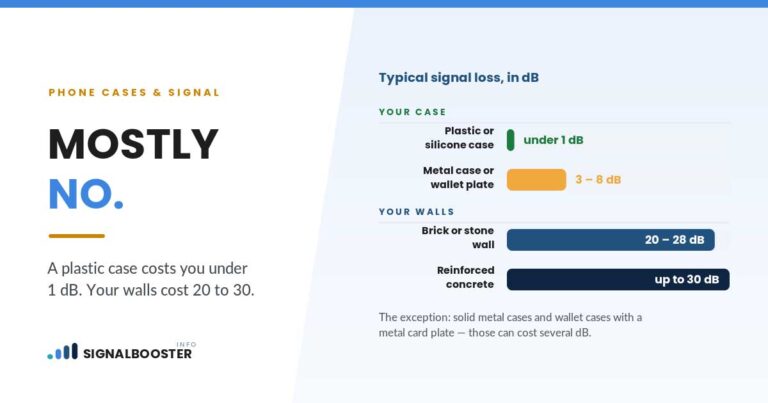
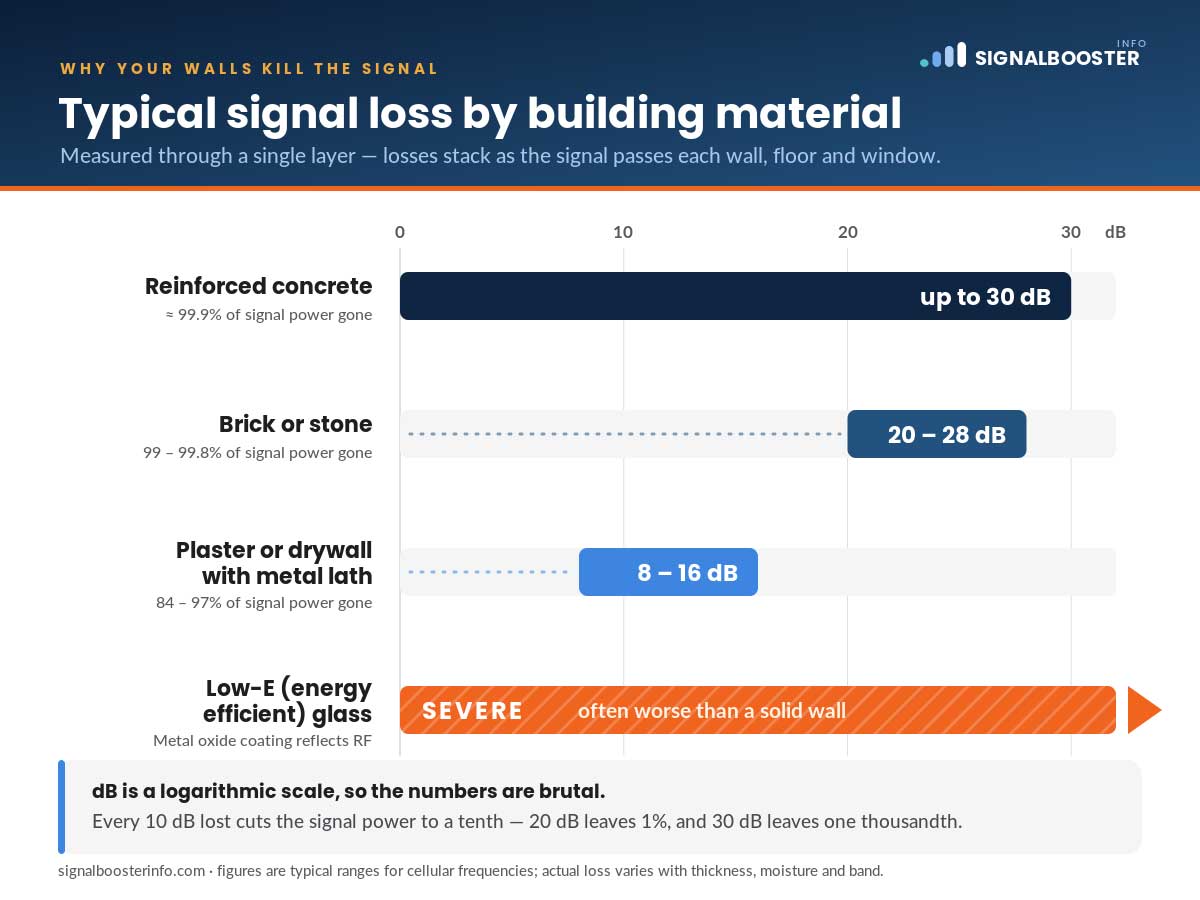
Cell signal is a radio wave, and radio waves lose energy passing through dense material. Documented testing by antenna and booster manufacturers puts typical losses in this range:
| Material | Typical signal loss |
|---|---|
| Reinforced concrete | Up to roughly 30 dB |
| Brick or stone | Roughly 20 to 28 dB |
| Plaster or drywall with metal lath | Roughly 8 to 16 dB |
| Low-E (energy efficient) glass | Severe, often worse than a solid wall |
A decibel scale is logarithmic, so these losses stack fast. A basement with concrete walls, a metal-lath ceiling above it, and a couple of Low-E windows on the level above can lose enough signal that almost nothing usable reaches your phone, even though the same phone works fine on the porch. This is why basements and interior rooms are consistently the worst spots in a house, and why the “just move closer to a window” advice sometimes fails: if that window is Low-E glass, it can block more signal than the wall next to it.
Distance from the tower
Signal strength drops with distance from the source, the same way a flashlight beam fades the farther you get from it. In a dense suburb you might be within a mile of a tower without knowing it. In a rural area, the nearest tower could be five, ten, or more miles away, and the signal that reaches your property is already weak before it ever meets your walls. If your outdoor bars-outside test came back weak or empty, distance (or a genuine coverage gap in your carrier’s network) is a more likely cause than your building.
Carrier network issues
Sometimes the building and the distance are both fine, and the problem is your carrier’s coverage in that specific spot. Every carrier’s tower map has gaps and weak edges that have nothing to do with your house. Switching to a different plan on the same network won’t change this; only a different carrier’s tower placement, a network extender from your carrier, or a booster (if there’s signal to boost) will. I compare this trade-off directly in signal booster vs. switching carriers.
Weather, Network Congestion, and Other Temporary Culprits
Some causes come and go, which is why “it worked fine last week” doesn’t rule anything out.
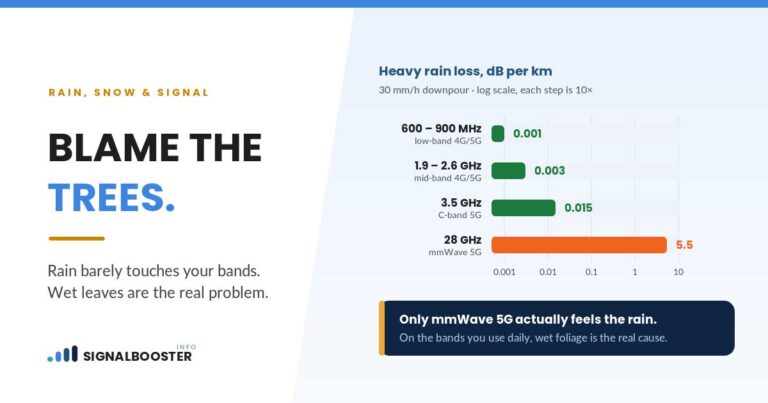
Weather. Heavy rain, snow, and dense fog contain water, and water absorbs radio waves. A storm can knock a marginal signal down to nothing for the duration of the storm, then it recovers once the weather clears. If your dead zone gets noticeably worse during bad weather and better afterward, that’s a real, temporary effect, not your imagination.
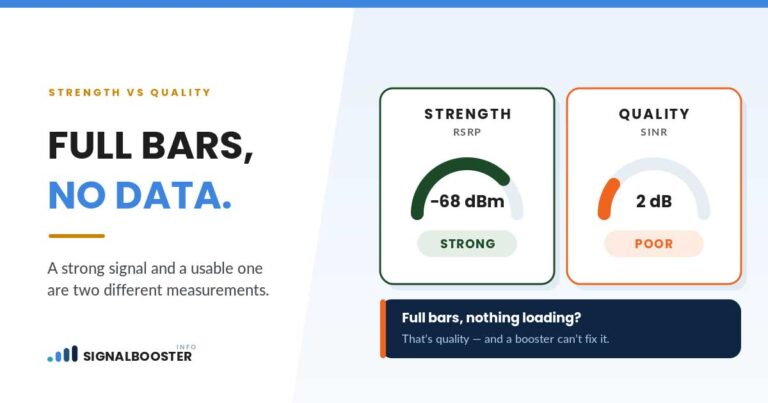
Network congestion. Towers have finite capacity. At 6 p.m. on a weekday, or during a local event, everyone in range is trying to use the same tower at once, and your phone can show full bars while calls still drop or data crawls. This looks like a signal problem but is really a capacity problem, and no signal booster fixes it, because a booster amplifies the existing signal, it doesn’t add tower capacity.
Device and case issues. Less common, but worth ruling out before you blame the building: a thick metal or magnetic phone case, a cracked internal antenna from a drop, or a phone stuck on an outdated network setting can all mimic a coverage problem in one specific room or one specific phone. If a second phone in the same spot gets noticeably better signal than yours, check the case and settings before you check the walls.
Quick reference: match what you found to the likely cause
| What you notice | Likely cause | What actually helps |
|---|---|---|
| Good signal outside, weak signal only in certain rooms | Building materials (concrete, brick, Low-E glass) | A booster, once you confirm real outdoor signal exists |
| Good signal outside, weak everywhere indoors, worse at busy times of day | Network congestion (capacity, not strength) | Nothing a booster fixes; it eases when the tower is less loaded |
| Weak or no signal outside too | Distance from the tower or a genuine coverage gap | Wi-Fi calling, a carrier network extender, or switching carriers; a booster may not help |
| Weak only during storms, fine otherwise | Weather (temporary) | Nothing to fix; it recovers on its own |
| Weak only on one phone, another device is fine in the same spot | Device or case issue | A different case, a settings check, or a repair, not a coverage fix |
How I Diagnose a Dead Zone on a Real Job (Step by Step, in Order)
This is the order I actually work through on a real visit, because doing it out of order wastes time chasing the wrong cause.
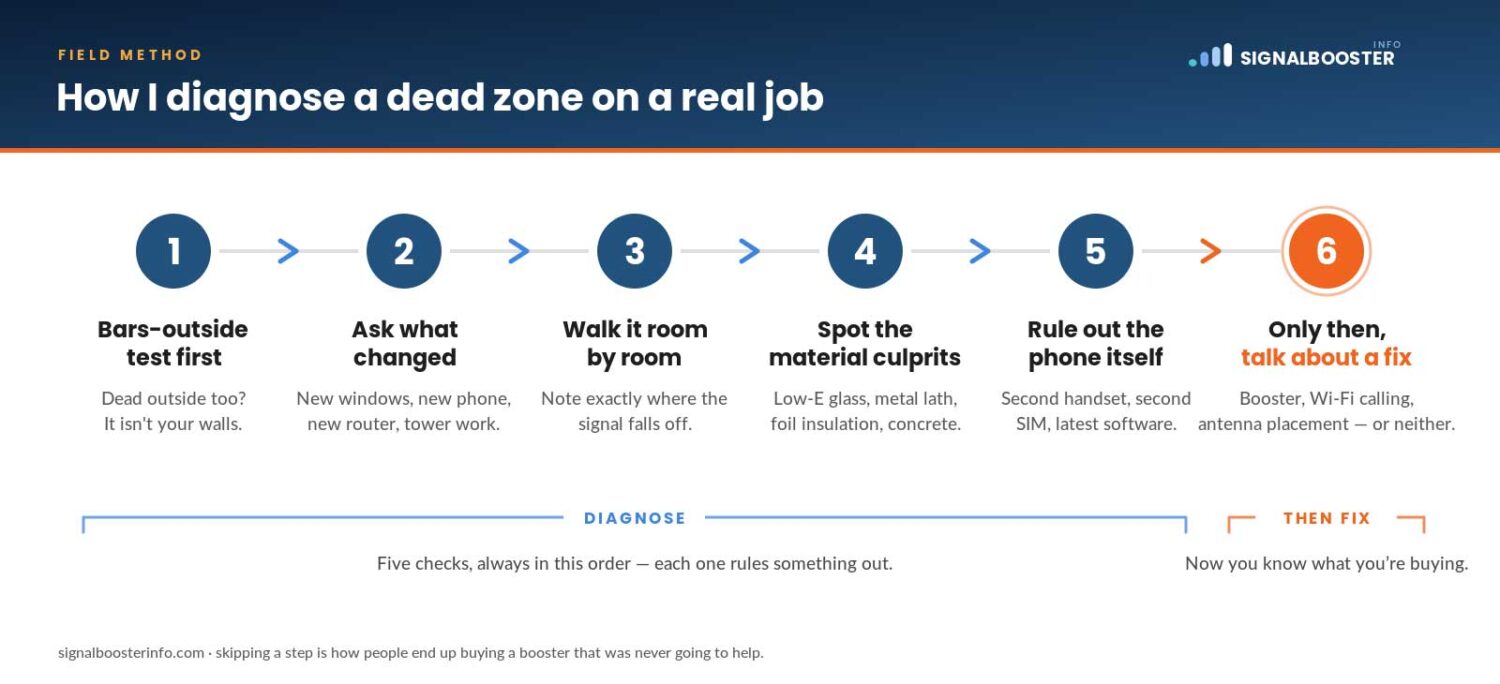
- Bars-outside test first. Confirms whether the problem is the building or the location.
- Ask what changed, if anything. New windows, a metal roof, a finished basement, or a move to a new house often explains a sudden drop that wasn’t there before.
- Walk the interior with the phone, room by room. I’m mapping where signal drops off, not just noting the worst room. A gradual fade toward the center of the house points to material loss; a signal that’s uniformly weak everywhere, including near windows, points to distance or a carrier gap.
- Check for the obvious material culprits. Basement location, concrete or brick exterior, metal roofing, Low-E windows, stucco with metal lath underneath.
- Rule out the phone itself. Different case, different phone if one’s available, airplane-mode-off toggle, and a check of network settings.
- Only then talk about a fix. By this point I know whether I’m dealing with a building problem, a location problem, a carrier problem, or some mix, and that determines what’s actually worth spending money on.
I learned to work in this order the hard way. My first install, back in 2018, I skipped straight to “buy the equipment” without doing this walkthrough first, mounted the antenna backward, and made my own signal worse. I’ve written the full account on my story, partly so nobody else has to learn it the same way I did.
When a Booster Won’t Fix It, and What Will
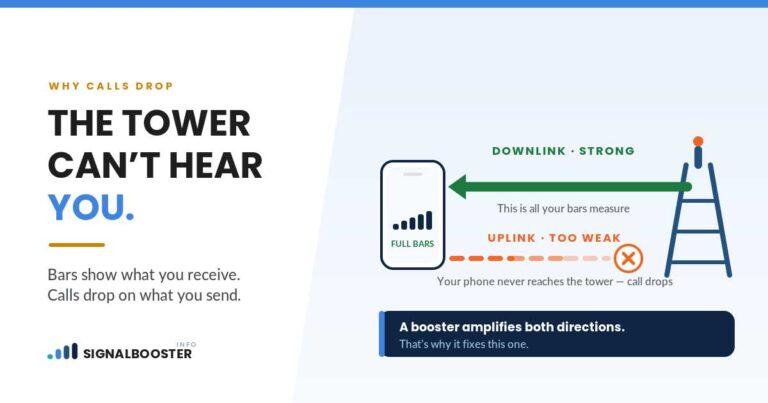
Here’s the section most sites selling boosters don’t spend much time on: a signal booster amplifies an existing signal, it does not create one from nothing.
That means a booster needs at least some usable signal outdoors to work with. If your bars-outside test came back at zero, or you have to drive down the block to get a single bar, there is nothing there for a booster to amplify, no matter how good the equipment is. In that situation, a booster is very likely to disappoint you, not because it’s a bad product, but because the input it needs simply isn’t present at your address.
In that case, the options that can actually help are different:
- Wi-Fi calling, built into most modern phones, routes calls and texts over your home internet connection instead of the cell network. If your home Wi-Fi is reliable, this alone can solve indoor dead zones that have nothing to do with distance.
- A carrier network extender (femtocell), offered by some carriers, creates a small cell signal in your home using your internet connection rather than an outdoor tower signal. Availability and terms vary by carrier, so check directly with yours.
- Switching carriers, if a competitor’s tower coverage is genuinely better at your address, though this only helps if the problem is carrier-specific rather than building-specific. I cover this trade-off in signal booster vs. switching carriers, linked above.
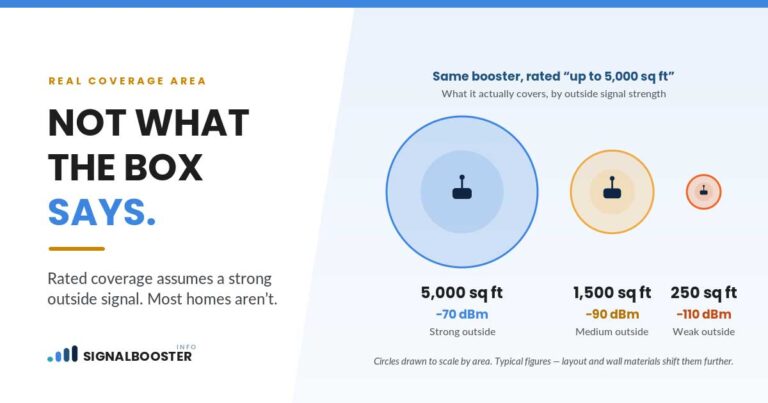
- A signal booster, once you’ve confirmed there is real outdoor signal to work with. How much of your home it will actually cover, versus what the spec sheet promises, is its own question, one I answer honestly in how much coverage a signal booster really gives you.
And if legality is on your mind before you spend anything, boosters sold in the US are legal to use when registered correctly with your carrier, which I explain plainly in is a signal booster legal.
The honest summary: a booster is a great fix for “weak signal because of my walls.” It is not a fix for “no signal because there’s nothing out there to boost.” Knowing which situation you’re actually in, using the bars-outside test above, is what keeps you from spending money on the wrong solution.
FAQ
Can weather really affect my signal?
Yes. Rain, snow, and fog all contain water, and water absorbs radio waves. A storm can weaken an already marginal signal noticeably, and it typically recovers once the weather clears.
Why is my signal fine outside but bad inside?
This points to building materials, not distance or your carrier. Concrete, brick, metal roofing, and energy-efficient (Low-E) glass all block or absorb radio waves at levels that add up fast, especially in basements and interior rooms.
Will a signal booster fix a dead zone with no outdoor signal at all?
No. A booster amplifies existing outdoor signal, it can’t create signal where there isn’t any. If your bars-outside test shows zero or near-zero, look at Wi-Fi calling, a carrier network extender, or switching carriers instead.
Does my phone case or a cracked antenna affect signal at home?
It can. Thick metal or magnetic cases and a damaged internal antenna can weaken reception in ways that look like a coverage problem but are actually about the device. Testing a different phone or case in the same spot helps rule this in or out.
Is network congestion the same thing as a dead zone?
No. A dead zone is a signal strength problem, congestion is a capacity problem. You can show full bars and still have calls drop or data crawl at busy times because too many people are using the same tower at once. A booster does not fix congestion.