Short answer: usually not. Rural internet is the connection that feeds your home network, whether that arrives by cable, DSL, satellite, fixed wireless or a cellular router. Rural cell signal is the radio link between your phone and the nearest tower. A cell signal booster only strengthens that second link. It does nothing for a slow satellite dish or a weak Wi-Fi router. The one case where the two problems overlap is cellular home internet, because that service rides the same towers your phone does. Before you buy anything, find out which link is actually weak.
This guide shows you how to separate the two, how to test each one with tools you already own, and which fix matches which problem.
Rural Internet vs Cell Signal: Three Links, Not One
Most rural connectivity complaints get lumped into one sentence: “the signal out here is terrible.” In practice there are at least three separate links, and each one fails in its own way.
- The cellular link. Your phone talks directly to a carrier tower. Its quality depends on distance, terrain, building materials and how busy that tower is. This is the link a signal booster works on.
- The home internet link. Something brings internet to the property: a phone line, a cable, a fiber drop, a satellite dish, a fixed wireless antenna pointed at a provider’s tower, or a cellular router. Its quality depends on that provider’s network, not on your phone.
- The in-home Wi-Fi link. Your router spreads the home internet connection around the house. Thick walls, distance from the router and interference decide how well it reaches each room.
A problem in any one of these can look like “no signal” from the couch. A phone with Wi-Fi turned on may be using link 3, then link 2, and never touching link 1 at all. That is why people buy a booster, install it carefully, and find their video calls are exactly as bad as before.
What a Cell Signal Booster Actually Fixes
A booster has three parts: an outdoor (donor) antenna, an amplifier, and an indoor antenna. The outdoor antenna picks up the carrier signal already reaching your property, the amplifier raises it, and the indoor antenna rebroadcasts it inside. If you want the longer explanation, the overview of what a signal booster is walks through each component.
The limit is simple. A booster needs something to amplify. weBoost, a booster manufacturer, says this plainly on its rural booster guide, which we read on September 25, 2026: “a cell phone booster can’t create a signal if there is zero signal available because there is simply nothing to boost.”
What that means for the rural internet vs cell signal question:
- A booster can help calls, texts and cellular data on phones and other cellular devices.
- A booster can help a cellular home internet router or hotspot, because that device is also using the carrier’s cellular signal.
- A booster does not touch satellite internet, DSL, cable, fiber, or a fixed wireless system that uses its own dedicated antenna and provider network.
- A booster does not extend Wi-Fi. A mesh system or a better-placed router does that.
Where the Two Problems Really Are the Same: Cellular Home Internet
In many rural areas, the fastest home internet on offer is a cellular plan: a router or hotspot with a SIM card that connects to the same carrier towers your phone uses. In that setup, your home internet and your cell signal share the same weak point, which is the radio path from the property to the tower.
This is the case where improving the cellular link can improve your internet. A better outdoor antenna position, a directional antenna aimed at the right tower, or a booster can lift the signal the router receives. It is also the case where the fix has to be measured, because a stronger cellular link can still hit a slow internet ceiling if that tower is congested at the times you use it.
The reverse also holds. If your cellular router connects well but the far bedroom has no Wi-Fi, a booster will not help that room. The weak link there is Wi-Fi, not cellular.
A Measurement Triage: Which Link Is Weak?
Guessing is expensive. Test each link separately, write down what you see, and let the numbers decide. You need your phone, a laptop if you have one, and about half an hour.
Step 1: Test the cellular link with Wi-Fi off. Turn off Wi-Fi on your phone so it cannot fall back to your home connection. Open your phone’s field test screen or a signal app and note the signal strength in dBm (RSRP) and a quality figure such as SINR or RSRQ. Do this indoors where the problem happens and again outdoors, at the spot where an outdoor antenna could go. Our guide on how to check your phone’s real signal strength in dBm shows where to find these numbers on iPhone and Android.
Step 2: Test the home internet link without Wi-Fi in the way. If your router has a network port, plug a laptop in with a cable and run a speed test. If that is not possible, stand right beside the router. This tells you what the connection coming into the house delivers.
Step 3: Test Wi-Fi where you actually use it. Run the same speed test in the problem room over Wi-Fi. Compare it to Step 2.
Step 4: Read the pattern.
| What you measured | Weak link | Fix that matches |
|---|---|---|
| Poor cellular readings indoors, better outdoors; home internet speed fine | Cellular link, blocked by the building | Wi-Fi calling, or a signal booster fed from a good outdoor spot |
| Poor cellular readings indoors and outdoors; home internet fine | Cellular link, weak at the property | Wi-Fi calling first; a booster only if a usable outdoor signal exists |
| Wired speed test slow; phone signal fine | Home internet service | A different internet provider or plan; a booster will not help |
| Wired speed fine; Wi-Fi slow in far rooms | In-home Wi-Fi | Router placement, a mesh system or a wired access point |
| Cellular router is your internet, and both readings are weak | Shared cellular link | Better antenna placement, a directional antenna, or a booster, then retest |
Two cautions apply. First, a signal app reading can jump around from moment to moment, so take several readings and note the typical value rather than the best one. Second, strength and quality are different measurements. A strong reading with poor quality usually points to interference or a busy tower, which a booster cannot fix. The explainer on signal strength vs signal quality covers how to read the two together.
When Your Phone Works but Data Does Not
A common rural pattern is that calls connect, but web pages crawl. People take this as proof that the internet is the problem. Sometimes it is, but often it is still the cellular link.
Voice calls need very little data and hold up on weak signal. Data needs a cleaner, stronger link, and it suffers first when the tower is busy or the signal quality is poor. If you are testing with Wi-Fi off and your phone’s data is slow while calls are fine, the issue is almost certainly cellular. The article on why a booster can help calls but not data explains the reasons, including the ones amplification cannot touch.
If you are testing with Wi-Fi on, you do not know which link carried the data. Turn it off and test again.
Fixes That Cross Over: Wi-Fi Calling
Wi-Fi calling is the tool that deliberately swaps one link for the other. It sends your calls and texts over your home internet instead of the cellular network. Verizon’s Wi-Fi Calling FAQ, read on September 25, 2026, describes it as letting you “make and receive voice calls, texts and video calls over a Wi-Fi (wireless internet) connection instead of using a carrier’s cellular network,” including where cellular coverage is weak or absent.
That makes the triage above useful in a second way. If your home internet link is solid and your cellular link is the weak one, Wi-Fi calling may fix the indoor calling problem with no hardware at all. If your home internet is the weak link, Wi-Fi calling moves your calls onto the worse connection.
Wi-Fi calling only helps on your property, where your Wi-Fi is. It does nothing for the driveway, the barn or the back field, where a booster or better outdoor coverage is the only answer.
The Honest Limits
This is the part most rural booster pages leave out.
- A booster cannot fix a provider problem. If a wired speed test is slow, the bottleneck is the internet service. No amplifier on your roof changes that.
- A booster cannot fix a busy tower. If signal strength is fine but speed collapses at certain times, the tower is likely congested. More signal does not add capacity.
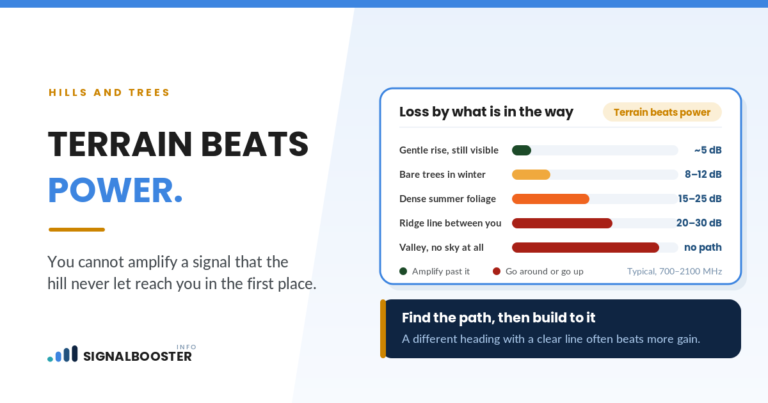
- A booster cannot create coverage where none exists. If no spot on the property shows a readable signal, amplification has nothing to work with.
- Satellite and fixed wireless internet are outside a booster’s reach. They use their own equipment and frequencies. Their performance depends on dish or antenna placement and the provider’s network.
- Coverage maps do not settle the question. Maps are models. Your own readings at your own property are the evidence.
Knowing which link is weak also saves you from fixing the wrong one twice. People who change internet providers to fix dropped calls, or buy boosters to fix slow streaming over satellite, are solving a real problem with the wrong tool.
A Simple Decision Path
Once your measurements are written down, the choice usually narrows quickly:
- Home internet is good, phone signal is poor indoors: try Wi-Fi calling first. If you still need coverage outside Wi-Fi range, or you want every cellular device to benefit, look at a booster sized to your measured outdoor signal.
- Home internet is poor, phone signal is fine: this is an internet provider question. Compare what is actually available at your address: a wired service, fixed wireless, satellite or a cellular plan.
- Home internet is a cellular router: treat it as a cellular signal problem. Improve the antenna position first, confirm which tower you are using, then consider a booster, and retest with the same method so you can compare before and after.
- Everything measures fine near the router but not in far rooms: fix Wi-Fi coverage, not the connection.
FAQ
Will a cell signal booster improve my rural internet?
Only if your internet is delivered over the cellular network, through a cellular router, hotspot or phone. A booster does not affect satellite, DSL, cable, fiber, or fixed wireless internet that uses its own provider antenna, and it does not extend Wi-Fi inside the house.
Is rural internet the same thing as cell service?
No. Rural internet is the connection that feeds your home network, and it can arrive by wire, satellite, fixed wireless or cellular. Cell service is the radio link between your phone and a carrier tower. They overlap only when your home internet is a cellular plan.
Can Wi-Fi calling replace a signal booster?
Indoors, often yes, if your home internet is reliable. Wi-Fi calling routes calls and texts over your internet connection instead of the cellular network. It does not help outside the range of your Wi-Fi, and it gets worse if the home internet itself is the weak link.
How do I know if my problem is cell signal or internet?
Test them separately. Turn Wi-Fi off and check your phone’s signal in dBm indoors and outdoors. Then run a speed test on a device wired to the router, or standing right beside it. Whichever link measures poorly is the one to fix first.
Does a booster help satellite internet?
No. Satellite internet uses its own dish and frequencies, and its performance depends on a clear view of the sky and the provider’s network. A cellular booster works only on carrier cellular signals.